A Complete Guide to Static IPs: Costs, IPv4, IPv6, and More
In this guide, we dig into what Static IP addresses are (vs. dynamic IPs), IPv4 vs. IPv6 transition considerations and strategies, Static IP costs, and more.

Oct 1, 2025
SHARE
Automate the telecom lifecycle
Get better quotes, launch sites faster, keep inventory accurate, and control spend.
A static Internet Protocol (IP) address is a fixed numerical identifier assigned to a device on a network, such as a computer, server, or router. Unlike dynamic IP addresses, which can change each time a device connects to the internet, a static IP remains constant and provides a reliable and consistent point of contact.
This steadiness is invaluable for devices that need to be easily located over the internet, such as web servers, email servers, or networked devices requiring frequent remote access.
This helpful guide explores how static IP addresses work. It also explains why businesses rely on them and when the best time to make the switch is.
What Is an IP Address?
An IP address is a unique address that identifies a device on the Internet or a local network. It’ll look more like a string of numbers and dots (ex., 192.168.1.1) than your home address. “IP” in this instance stands for “Internet Protocol,” which is the set of rules governing the format of data sent via the Internet.
The internet requires unique identifiers to differentiate between different devices and websites that send and receive data so that information is always routed to the correct destination. IP addresses are a core part of how the internet functions.
Why IPv4 Vs IPv6 Is Important to Businesses
When Internet Protocol version 4 (IPv4) was created, addresses were based on a 32-digit number. That creates a large set of possible numbers for each address—about 4.3 billion possible numbers.
However, 4.3 billion will be nowhere near enough to satisfy the growing demand for IP addresses. This large but finite number of possible static IP addresses is rapidly approaching exhaustion. And when demand far exceeds supply, you soon end up paying the price.
Fortunately, the creation of Internet Protocol version 6 (IPv6) means we’re not locked into a situation where Internet Service Providers (ISPs) charge ever-increasingly extortionate amounts to get you a bunch of static IPs.
IPv6 addresses are based on a 128-digit number, which means the number of potential addresses is exponentially bigger (340 undecillion IP addresses if you don’t fancy doing the math). Based on current growth rates, IPv6 should provide IP addresses for a few thousand generations.
The migration that every business will eventually undergo is no laughing matter. It’s a laborious project with both known and unknown variables to consider.
What Is IPv4?
For simplicity’s sake, we described IPv4 addresses earlier as a 32-digit number. However, it’s more accurate to describe IPv4 addresses as four octets (8-bit segments) of binary code.
These zeros and ones are used to describe a smaller number for each octet, which is the number we see when we pull up our IPv4 address. The binary octets (and their corresponding number values) are separated by periods.

Each binary octet can provide 256 different possible combinations, so the number value in the IP address we see will be between zero and 256. As we mentioned, the potential variations amount to 4.3 billion unique numbers.
What Is IPv6?
IPv6 addresses are constructed using the same principles of grouped sections of binary code. However, rather than four groups of eight binary digits, IPv6 uses eight fields of 16-bit binary code separated by colons.
The IP address you’ll see would look something like 2001:0db8:85a3:0000:0000:8a2e:0370:7334. But the binary code underpinning this IP address would resemble something like this:

It’s quite common to see a double colon in the numerical representation of an IPv6 address. Don’t worry, it’s not a typo; it just means that every binary value within that set of 16 is a zero. Here’s how that works:

When you have that much binary to play with, there are 340 undecillion possible IP addresses that can be assigned. If you’re not familiar with undecillions, here’s an analogy to explain just how mind-blowingly large that number is.
Imagine that every atom on the surface of planet Earth had its very own IPv6 address. You’d still have about 99% of your possible IPv6 addresses left untouched.
Key Challenges of the IPv4 to IPv6 Transition
The shift from IPv4 to IPv6 is a considerable undertaking, not a simple weekend project. It’s a laborious process with known and unknown variables that require careful planning. While the cost of IPv4 addresses may not yet seem steep enough to force the move, understanding the hurdles is the first step toward a future-proof network.
Hardware and Network Compatibility
Your existing infrastructure is the first major checkpoint. Every piece of network equipment, from routers and switches to servers and firewalls, must be evaluated for IPv6 compatibility. While most modern hardware is built to handle both protocols, older devices may need costly upgrades or even replacement. Beyond individual devices, you face the fiendishly complex procedure of re-IPing your entire network, which requires extensive testing in a lab environment to avoid disrupting live operations.
External Dependencies and Ecosystem Readiness
You don’t operate in a vacuum. Your network’s performance relies on a chain of external partners. A significant risk is that your local hosts, network partners, or even your own ISP may not be fully committed to IPv6 throughout their operations. If you migrate too soon without confirming their readiness, you risk critical elements of your network or resource access disappearing overnight. This requires a coordinated effort, not just an internal one.
Security and Compliance Headaches
Any large-scale network overhaul can expose new security vulnerabilities. While IPv6 has its own embedded security features, the transition period itself is risky. If you're running secure, end-to-end solutions, the migration can feel like a game of "whack-a-mole"—resolving one compliance issue only to have another pop up elsewhere. Ensuring consistent security and compliance across a hybrid IPv4/IPv6 environment requires meticulous planning and continuous monitoring.
Mapping Topologies and Future-Proofing
Finally, there's the challenge of the unknown. IPv6 utilizes different address types (unicast, multicast, and anycast) that offer a wider range of delivery options. These configurations are tricky to map to existing IPv4 topologies and require you to think carefully about how remote systems will access your network, both now and in the future. It’s not just about rebuilding what you have; it’s about building what you will need.
Static vs. Dynamic IP Addresses
IP addresses are assigned in one of two different ways, and it’s this method of assignment that defines the IP address as static or dynamic. A static IP address is manually set up on a device, essentially reserving that specific address for a fixed location, typically a server. In contrast, dynamic IP addresses are automatically assigned by the Dynamic Host Configuration Protocol (DHCP), which chooses an available address from a predefined pool or “block”, which is a range of pre-assigned IP addresses.
For simplicity, static IPs are sometimes referred to as public IPs, which means the entire internet can identify the IP as a unique and specific endpoint. Dynamic IPs are associated with private IPs, which are disguised from the broader internet via the DHCP process previously described.
We should point out that DHCP can also assign public IP addresses; that’s why static/dynamic doesn’t always correlate with public/private. But it’s a useful rule of thumb because the public and private terminology gives us a clearer understanding of the reasons to choose one type of IP over the other.
Why Use Public IP Addresses Instead of Private IPs?
Public IP addresses are necessary to connect to the internet. It’s easier to understand if you think about the internet you get at home. Your router has a public IP. It’s probably the only thing in your home that does.
Everything else in your home that connects to the router is assigned a private IP address. This includes devices like your computer, your Smart TV (and your fridge and your vacuum, if you’re into that whole IoT vibe).
So, why would you need multiple public IP addresses? It’s easy to find enterprise use cases.
Your website requires a public IP. Anyone browsing the web needs to find that unique, specific endpoint associated with your business domain. Email domains also require a public IP.
Virtual Private Network (VPN) Tunnels require a public IP address for the VPN Concentrator (usually the firewall), allowing remote workers to connect to the secure network behind the firewall.
In a business context, you can see how use cases like these would require the use of several, sometimes many, public and static IP addresses.
Who Allocates the IP Addresses?
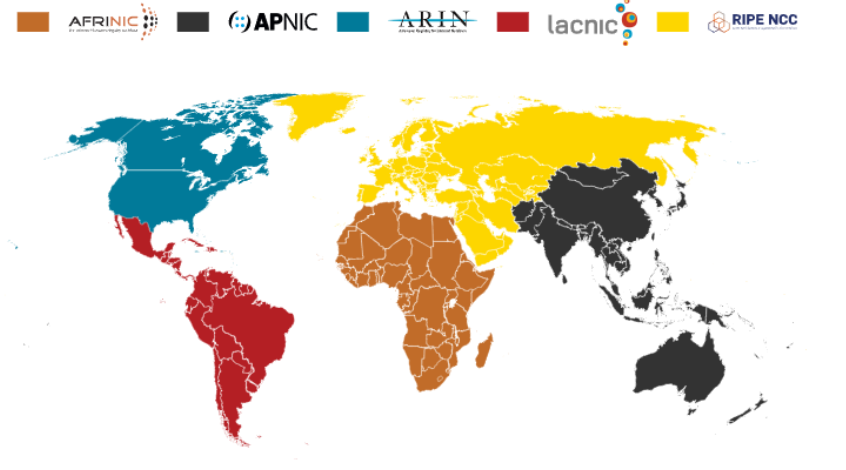
Both IPv4 and IPv6 addresses are allocated by the same group of governing bodies, overseen by the Internet Assigned Numbers Authority (IANA). Here’s a map to show you which regional body assigns the IP addresses in your neck of the woods.
How Much Do Public IPv4 IP Addresses Cost?
As mentioned earlier, IPv4 public IP Addresses are in high demand. Up until 2011, you could still get them for free from IANA. The Regional Internet Registry (RIR) supply dried up shortly afterward.
Now, anyone wanting a “block” of public IP space (256 individual IPs) is left with two options: rent or buy.
Public IPv4 IP address purchase costs are hefty. Gone are the days when your Regional Internet Registry would sell public IPs directly. An ecosystem of brokers has sprung up to manage the trade and exchange of this prized resource.
A block of 256 IPs that you could cherish forever went for a measly $2,560 back in 2014. Now, the same block is going to set you back $13,312, minimum.
Public IPv4 IP rental costs can be a more feasible expense. Back in 2014, when they first started charging, renting by the block would cost you $0.06 per IP. That’s $15.36 a month.
Anyone looking to rent IPs will naturally pay a much higher premium. At $0.55 per IP, that block is going to set you back $140.60.
Can I Rent a Smaller Block of Public IPs?
You can indeed rent a smaller block of public IPs, but there’s no hard and fast rule about how much it’ll cost you. They’re typically available as an “add-on” for an existing internet service.
The fee is wholly at the discretion of your ISP and is determined by local demand and other market factors. You may pay nothing, or in some cases, you might find yourself hit by costs of up to $25 a month for every additional IP address.
How Much Do Public IPv6 IP Addresses Cost?
As befits the near-infinite capacity of the IPv6 space, additional IPv6 IP addresses are much easier to come by than IPv4 IP addresses.
There’s little appetite for a rental market. Most ISPs are happy to provide you with as many IPv6 addresses as you want at no additional cost.
Should you wish to stake your claim and purchase a block of IPv6 IP addresses, you can still deal directly with your RIR. If you’re buying the standard block of 256, they’ll set you back a measly dollar apiece.
Dual Stacking IP Strategy
The Dual Stacking IP strategy takes its lead from the approach phone companies used to transition from 7-digit to 10-digit local dialing. They built out their systems to accommodate the use of both 7 and 10-digit numbers, and then, when everyone was accustomed to using 10 digits, they eventually phased out the 7-digit numbers.
Dual Stacking allows companies to run and access IPv4 and IPv6 content simultaneously. That way, the consistency and reliability of IPv4 are combined with the greater technical possibilities of an IPv6 network, and the company can spread the costs and hassle of the eventual migration over a much longer, less disruptive timeframe.
Any operational vulnerabilities, future-proofing opportunities, or incompatible equipment or systems can be identified at a leisurely pace.
Best Practices To Prepare for a Shift From IPv4 to IPv6
For prudent businesses and those with pressing IP address demands, the time to start planning your IPv4 to IPv6 shift is now. To prepare for this, there are a few best practices that you should consider implementing:
Network IT Staff Education
With the right staff and up-to-date education on the IP address crisis, most potential pitfalls during an IPv6 transition can be avoided. Yes, there are other concerns, but this is generally the largest, and it’s completely within your business’s control.
There is no shortage of training available. You can find quite a few training programs just by doing a simple internet search. The RIRs themselves have some guidance on IPv6 training to offer:
AFRNIC is the Regional Internet Registry (RIR) for Africa. It manages IP address allocation across the continent.
APNIC serves the Asia Pacific region. It supports ISPs, enterprises, and governments with internet resources.
ARIN oversees IP address distribution in Canada. It also oversees the United States and parts of the Caribbean.
LACNIC manages resources for Latin America and the Caribbean. It helps ensure fair distribution of IPv4 and IPv6 addresses.
RIPE NCC provides IP address management for Europe. It also provides management for the Middle East and parts of Central Asia.
If these aren’t the right fit for you, plenty of independent companies offer similar training.
Security Concerns
With any technological shift comes bad actors wanting to exploit it. IPv6 is no different.
Despite its inherent embedded security, any large-scale network overhaul can expose new security concerns. Ensure your network is properly secured from malicious attacks.
Network Inventory and Hardware
While we established this as a concern earlier, network inventory and hardware are still often overlooked when planning an IPv6 migration. All you need to do is scan your Local Area Network (LAN) for all devices.
From there, ensure each device is IPv6 compatible. Create a list of incompatible devices and calculate the cost of upgrading or replacing them as part of the project costs. As we noted earlier, most modern networking devices are fully able to handle IPv6, so this may not be as much of a cost concern as it initially seems.
IP Address Planning
Smart companies run on smart planning. IP address control and monitoring are no different. You likely already have an effective IPv4 address scheme to make things easier to locate, isolate, and troubleshoot. IPv6 needs the same.
Domain Name System Servers
Domain Name System (DNS) servers make it easier for users to navigate the internet, primarily by allowing the user to navigate to a domain name and automatically resolve it to an IP address. Ensure that you have a good handle on your DNS servers, that they’re IPv6 compatible, and that they have the appropriate IPv6 address preplanned.
Deciding on a Transition Strategy
With these best practices in hand, it’s time to choose the right transition strategy. Dual stack has proven successful and appears to have the highest adoption rate. In this approach, both IPv4 and IPv6 run simultaneously on the network.
However, there are also other options:
IPv6 tunneling (encapsulated IPv6 inside IPv4 packets): Lightyear has seen this used when mergers and acquisitions unite companies with a mix of IPv4 and IPv6 addresses. IPv6 tunneling allows IPv6 networks to remain isolated and route over IPv4 backbone links.
NAT64/DNS64 (to translate between IPv4 and IPv6): This is a newer but fairly straightforward transition strategy. NAT64 translates IPv6 addresses into IPv4 and vice versa. This allows IPv6-only devices to send packets to IPv4-only servers and receive responses. NAT64 is typically paired with DNS64, which synthesizes IPv6 addresses from IPv4 DNS records. When an IPv6-only device queries a domain, DNS64 provides a synthesized IPv6 address that points to the IPv4 server.
No matter which of the three transition strategies you choose, remember that planning and preparation will remove most of the headaches.
Initial Steps for Transitioning to IPv6
With your transition strategy settled and your best practices met, now comes the easy part—requesting your IPv6 space.
The overabundance of IPv6 space makes it extremely convenient to request and obtain IPv6 addresses. There are two typical tracks.
Request IPv6 Addresses From Your Local Regional Internet Registry
Determine which RIR applies to your location that needs public IPv6 space. Then:
Log on or create an account with the appropriate RIR
Follow the RIR steps to apply for IPv6 space
After reviewing your application, the RIR will assign and register your block
There are fees associated with this process that vary per RIR. These fees include:
Annual membership
Initial allocation
If your business is looking for long-term control and retention of the IPv6 space, you will likely want to take the following route.
Request IPv6 Addresses From Your Internet Service Provider
This step lets you bypass RIR registration and fees and request the IP addresses you need directly from the ISP that supplies your site.
If the IP address space you need doesn’t serve a critical business purpose and if it’s fine to transition to new IPs, should you ever decide to change your service provider, this may be your best option.
ISPs typically charge a very nominal fee for IPv6, and often, they don’t charge anything at all. This does vary depending on your ISP, so you will need to ask and confirm.
Continuously optimize your network
Final Steps for IPv4 to IPv6 Transition
Now, you have successfully:
Trained your information technology (IT) team
Prepared your business for the IP transition
Picked an appropriate migration strategy
Obtained your IPv6 addresses
We also recommend using a sandbox or lab environment to test the migration strategy before you jump in and move your company in real time. Several of the RIR training courses have test environments available to help you. Private tools are also available.
Test environments are a key way to avoid business interruption during a migration. Once you’re happy with how the migration pans out in the test environment, you’ll be ready for a smooth, simple shift from IPv4 to IPv6.
Real-World Use Cases for a Static IP
Although they may seem like it, static IPs aren’t just abstract numbers. They’re designed to solve real problems for businesses.
If you’ve ever been on the receiving end of a dropped video call, struggled to access a remote server, or worried about the security of your data, then you already understand why static IPs matter. Here are some real-world use cases for how static IPs help enterprises across the board.
Remote Teams and VPN Access
In the digital age, remote workers are more common than ever. This is why businesses rely on virtual private networks (VPNs).
When a business uses a static IP, their IT team can set up what’s called a “known address.” This makes it possible to ensure that only approved devices can connect. Think of it as a built-in security measure, like having a VIP guest list at the door instead of leaving the entrance open for anyone to walk in.
Healthcare and Compliance Needs
Many companies face strict privacy laws. This includes:
Hospitals
Clinics
Medical software companies
By using a static IP, these organizations can keep their systems consistent, traceable, and protected. Static IPs aren’t just about convenience; they help businesses meet compliance requirements without constantly building temporary workarounds.
Payment Processing and Retail
Unless you’re paying with cash, you’ve already experienced how reliant retailers are on internet connectivity. Every time you swipe your card, payment gateways need to stay online without interruptions. Static IPs help ensure transactions don’t fail mid-sale, which protects both the business and the customer.
E-Commerce and Email Deliverability
For online stores, email is everything. Whether it’s sending order confirmations, shipping updates, or marketing campaigns, emails have to reach customers’ inboxes.
With a static IP, those emails are viewed as more credible by spam filters. That boosts the chances they’ll land in inboxes instead of vanishing into junk folders.
The Small Business Perspective
When most people hear about static IPs, they usually picture big corporations with massive IT teams. But that’s not always the case. More and more often, small businesses and startups benefit from static IPs.
Take a solo entrepreneur as an example. In many cases, a dynamic IP is fine for a business like running an Etsy shop out of your living room.
But once you start layering in tools such as a business website hosted on your own server, VoIP phone systems, or frequent video calls with clients, that’s when a static IP starts making sense. It makes everything run smoother, so your business can scale without constant headaches.
The main advantage for small businesses is stability. You’re not stuck resetting connections, reconfiguring devices, or explaining to vendors why your system suddenly went offline because your IP changed overnight.
A static IP acts like a permanent business address instead of a temporary P.O. box. Vendors, partners, and customers always know where to find you.
Another perk is accessibility. Static IPs can often be added to existing business internet plans. You don’t need a giant budget or a huge staff to use one. Plenty of smaller organizations rely on them to look professional and keep operations streamlined.
At their core, static IPs give even the smallest companies the same reliability once reserved for bigger competitors.
Pitfalls and Misconceptions
Despite the advantages of static IPs, there are plenty of myths and misunderstandings about how they actually work. Here are some of the most common pitfalls and misconceptions businesses should be aware of before making the switch.
“A static IP will make my internet faster.”
This isn’t true. Speed is determined by the quality of your internet connection and how your data is routed, not whether your IP is fixed.
What a static IP really does is eliminate disruptions caused by address changes. That consistency can make performance feel smoother, but it’s not the same thing as raw speed.
“Static IPs are automatically more secure.”
A static IP can contribute to stronger security when paired with the right tools, such as firewalls, VPNs, and monitoring systems.
On its own, it doesn’t guarantee protection. Think of it like locking your front door. It’s safer than leaving the door open, but you still need alarms, cameras, and sturdy windows to truly safeguard your space.
“One size fits all.”
Static IPs aren’t a universal solution. Businesses sometimes assume they need far more static IPs than they’ll ever use, which only adds unnecessary complexity and cost.
The smarter approach is to start with what you actually need today. Then, as your company grows, you can scale your static IP allocation in step with your operations.
Future-Proofing Beyond IPv6
Static IPs continue to matter, even as cloud services, managed platforms, and content delivery networks (CDNs) become the industry standard. Many businesses still want the control and predictability that only a static IP can provide.
Cloud + Static IPs
Most businesses today rely on cloud hosting, yet many still assign static IPs on top of that. Why? Because static IPs help with essentials like firewalls and VPNs.
It’s not a matter of choosing between “the cloud” or “static IPs.” The two often work together, giving businesses the flexibility of the cloud while maintaining a stable address for security and access.
Hybrid Environments
As serverless technology and other modern approaches continue to evolve, hybrid setups are becoming more common. Static IPs are ideal for bridging the old with the new. They give IT teams an anchor point in an otherwise fluid environment, ensuring that core systems remain reachable and consistent even as infrastructure shifts.
Customer Trust
Static IPs also play a role in building trust. Customers want to know their data is secure and that a company’s systems are dependable. A static IP provides a sense of permanence in an internet that’s constantly changing, helping reassure clients that the business is stable and professional.
How to Talk to Your ISP
If you’re ready to negotiate for a static IP, don’t be intimidated when contacting your internet service provider. You don’t need to memorize industry jargon or throw out acronyms to sound technical.
The key is to approach the conversation with the right questions prepared in advance. This ensures you understand exactly what you’re paying for and whether the plan will truly support your business needs.
What’s included in the monthly price?
Some providers roll static IP charges into bundled packages, while others keep them separate. Always ask for a clear breakdown of the monthly price so you can confirm you’re not paying for extras you don’t need or won’t use.
Are there hidden fees?
Ask directly about setup fees, equipment charges, or upgrade costs that could surprise you later. If your provider requires special hardware, find out whether it’s included in your plan or billed separately.
How flexible is the plan?
As businesses grow, so do networking needs. Even if you only need one static IP now, you may need more later. Ask how easy it is to add additional IPs down the road and what costs will look like when you expand.
What’s your support policy?
If your business depends on uptime, you’ll need reliable access to help. Ask whether they offer 24/7 customer support and what the response times look like.
If answers feel vague, press for details. And if the person you’re talking with can’t provide them, don’t hesitate to escalate the conversation to a supervisor. Transparency is key.
Static IPs in Action: Industry Snapshots
Static IPs aren’t just for IT departments or big tech companies; they’re a part of everyday operations across multiple industries. Looking at how different sectors apply them can give you a clearer picture of their real-world value.
Education
Schools and universities use static IPs to add a layer of security to student portals. By assigning a fixed IP, administrators can control which devices are allowed to log in and reduce the risk of unauthorized access. For remote learning platforms and exam systems, this stability is essential.
Financial Services
Banks rely heavily on static IPs to meet compliance standards. They’re also key for maintaining secure trading platforms and powering fraud detection systems that need reliable, traceable connections at all times.
Media and Streaming
Streaming platforms and broadcasters lean on static IPs to keep content delivery smooth and accessible. This matters most during high-traffic events, like live concerts or sporting matches, where even a small disruption could mean thousands of viewers lose access.
Manufacturing

Factories adopting Internet of Things (IoT) technology need their machines to communicate seamlessly. Static IPs allow connected equipment to reliably “speak” to each other, ensuring production lines stay coordinated and efficient.
Static IPs prove their worth far beyond the tech world. From classrooms to factories, they provide the predictability and security needed to keep critical systems running without interruption.
FAQs
Do I really need a static IP, or can I get by without one?
Whether you need a static IP depends on how your business operates. If you only rely on email, web browsing, and cloud platforms, then you may not need one.
But if you host servers, require guaranteed access to internal systems, or depend on VPNs, then a static IP is ideal. It reduces headaches before they arise and offers peace of mind.
Can I use one static IP for multiple devices?
Yes, but you’ll need the right setup. Many businesses run multiple devices through a single static IP by using firewalls and routers to manage connections. Your IT team can configure internal private IPs behind the single static IP so that multiple devices work seamlessly without conflict.
What is the risk if my static IP gets hacked?
The main risk comes from predictability. Since the IP never changes, hackers always know where to look.
That’s why strong authentication, firewalls, and intrusion detection systems are essential. Think of a static IP as a foundation. It’s helpful, but only part of your larger defense strategy.
Is IPv6 going to make static IPs free?
IPv6 greatly expands the number of available addresses, which prevents the scarcity problems of IPv4. But that doesn’t mean ISPs will hand them out for free.
You’ll still be paying for the service: support, allocation, and management. The addresses themselves may be plentiful, but the value lies in how they’re provisioned and maintained.
Do static IPs improve email deliverability?
Yes. Email servers reward consistency. When your messages come from the same IP, they’re less likely to be flagged as spam.
With dynamic IPs, on the other hand, emails often end up in junk folders because the source keeps changing. A static IP builds credibility over time, which helps your communications actually reach their recipients.
Can static IPs work with cloud services?
Absolutely. Many businesses blend the two. Static IPs can be used to secure connections, even if most of your apps and data live in the cloud. This hybrid approach is common because it combines flexibility with control.
What’s the biggest mistake businesses make with static IPs?
The biggest mistake is overcomplicating things. Some companies purchase more IPs than they’ll ever need. Others assume static IPs are a silver bullet for every security concern.
In reality, the smartest move is to start small, meet your immediate needs, and scale thoughtfully as your network evolves.
The Smart Path Forward: Managing IPs in the IPv6 Era

The transition from IPv4 to IPv6 is not a matter of "if," but "when." As this guide has shown, it's a monumental project fraught with challenges, from hardware overhauls to security concerns. It's no wonder many IT leaders choose to delay the inevitable, focusing on securing the increasingly scarce and costly static IP addresses they need for today's operations.
However, the smartest path forward isn't about choosing one protocol over the other; it's about creating a strategic roadmap. This involves managing your current static IPv4 needs effectively while proactively planning for a phased, cost-effective transition to IPv6. A dual-stack strategy allows you to operate in both worlds, ensuring today's stability while preparing for tomorrow's growth.
Navigating this complex landscape of IP brokers, carrier justification forms, and long-term transition planning is a daunting task. You don't have to do it alone. The experts at Lightyear can help you develop a comprehensive IP strategy that addresses your immediate circuit and addressing needs while paving a smooth runway for your eventual migration.
To discuss your static IP needs or your IPv4 transition strategy, try out Lightyear today.
Featured Articles
Want to learn more about how Lightyear can help you?
Let us show you the product and discuss specifics on how it might be helpful.
Stay up to date on our product, straight to your inbox every month.