2026 Network Documentation Templates [Free Downloads]
Download professional network documentation templates designed for 2026 infrastructure needs. Save time with ready-to-use formats for IT teams.

Jan 27, 2026
SHARE
Automate the telecom lifecycle
Get better quotes, launch sites faster, keep inventory accurate, and control spend.
Network documentation quickly becomes a mess for many IT teams. Device specs get scattered across different spreadsheets, configuration notes get buried in email threads, and IP assignments get tracked in someone's personal Excel file that may or may not be current across your network infrastructure.
Every IT professional faces this same documentation nightmare at some point in their career. You understand the importance of organized network documentation, but between handling daily tickets, managing updates, and putting out constant fires, building proper templates always gets pushed to "next quarter." Meanwhile, your team keeps storing critical information wherever it's most convenient at the moment, creating poor documentation practices.
We've seen countless IT teams stuck in this exact situation. They're managing sophisticated network infrastructures while relying on documentation methods that would embarrass a small startup.
The templates below were designed to help get your network documentation under control without starting from scratch.
At the end, we'll also show you a much easier and more efficient solution that can handle tracking and managing your networks automatically.
Tracking these systems can help you:
Avoid cost creep from auto-renewing contracts that have hidden cost escalations
Understand whether an outage is due to an actual network issue or a service/contract-related issue
Prevent slow and chaotic troubleshooting when you don't know which circuit has which IPs, VLANs, or configs (outages can be 6-7 figure problems for the business, depending on connectivity needs)
Maintain high levels of security by tracking IP and config details, which becomes existential as companies handle more sensitive data.
Downloadable Network Documentation Templates
We've created several simple spreadsheets to help you document and organize your networks, devices and projects:
Network inventory template
Static IP address template
Device inventory template
Project status tracking template
Each template below is available in both Google Sheets and Excel formats.
Network Inventory Template
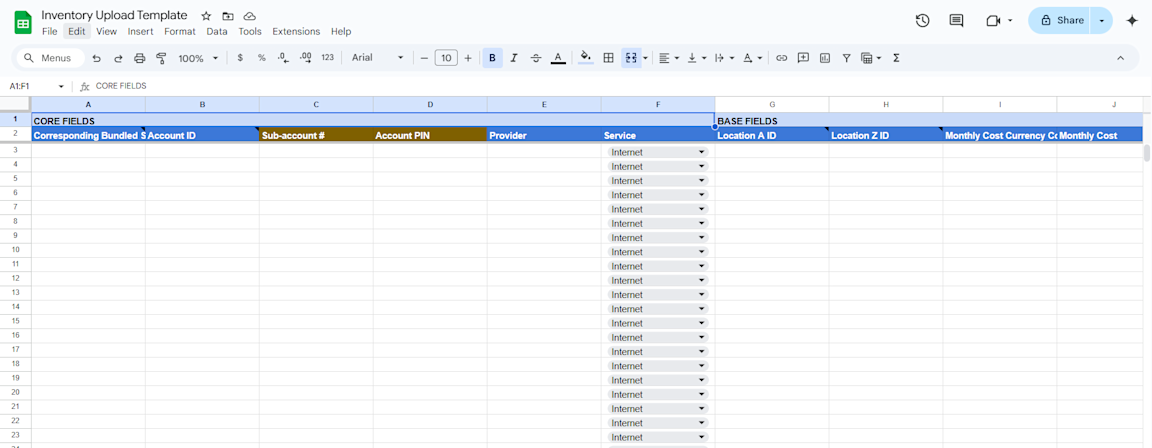
What this template includes:
Location Information: Track equipment locations with building addresses, room numbers, and GPS coordinates
Service Identification: Document provider names, account numbers, sub-account IDs, and PIN codes
Contract Details: Record service start/end dates, renewal terms, and cancellation notice periods
Costs and Billing: Keep track of monthly costs, installation fees, currency codes, and special charges
Technical Specifications: Document contracted vs. actual speeds, connection types, and service levels
Network Configuration: Capture IP blocks, router addresses, gateways, and subnet masks (IPv4/IPv6)
Circuit Details: Track circuit IDs, delivery points, last-mile providers, and utilization rates
Contact Information: Maintain vendor support numbers, account managers, billing contacts, and on-site personnel
IP Address Template
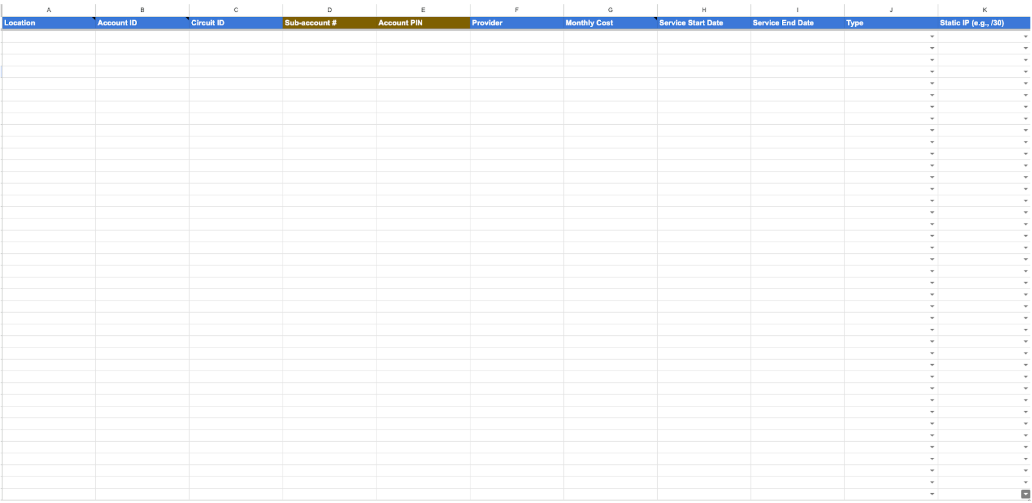
What this template includes:
Basic Circuit Information: Track location, provider, circuit ID, connection type, delivery point, and last mile provider
Account and Contract Details: Record account ID, sub-account numbers, PIN codes, service start/end dates, monthly costs, and availability SLA
Bandwidth and Performance: Document download/upload speeds, transport type and capacity, bandwidth tier, and committed burstable rates
Network Equipment and Infrastructure: Capture router, firewall, WAN label, and static IP assignment details
IPv4 Configuration: Track IPv4 blocks, WAN/router IPs, usable ranges, gateway/subnet/LAN settings, and BGP neighbors
IPv6 Configuration: Track IPv6 blocks, WAN/router IPs, usable ranges, gateway/prefix/LAN settings, and BGP neighbors
DNS and Routing: Maintain primary/secondary DNS servers, BGP configuration, and network ASN details
Continuously optimize your network
Device Inventory Template
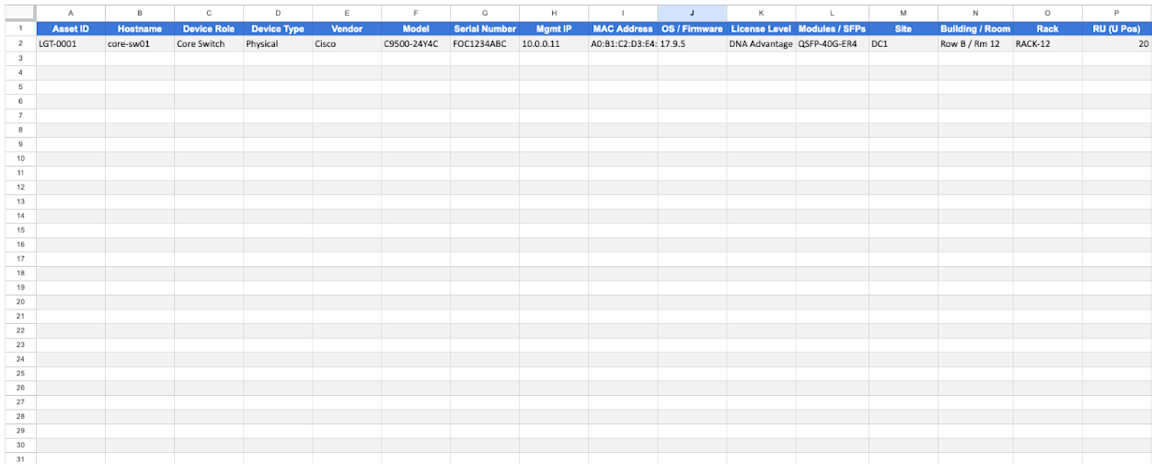
What this template includes:
Asset identity: Asset ID, Hostname, Device Role/Type, Vendor, Model, Serial Number for all hardware components
Network & software: Mgmt IP, MAC Address, OS/Firmware, License Level, Modules/SFPs
Location & rack: Site, Building/Room, Rack, RU (U position)
Power & thermal: Power (Watts), Heat (BTU/h), Redundant PSU (A/B)
Lifecycle dates: Purchase Date, In-Service Date
Warranty & contracts: Warranty Expiration, Warranty Days Left, Support Contract ID
Ownership & status: Owner/Team, Operational Status, Notes, Attachments/URL
Project Status Tracking Template
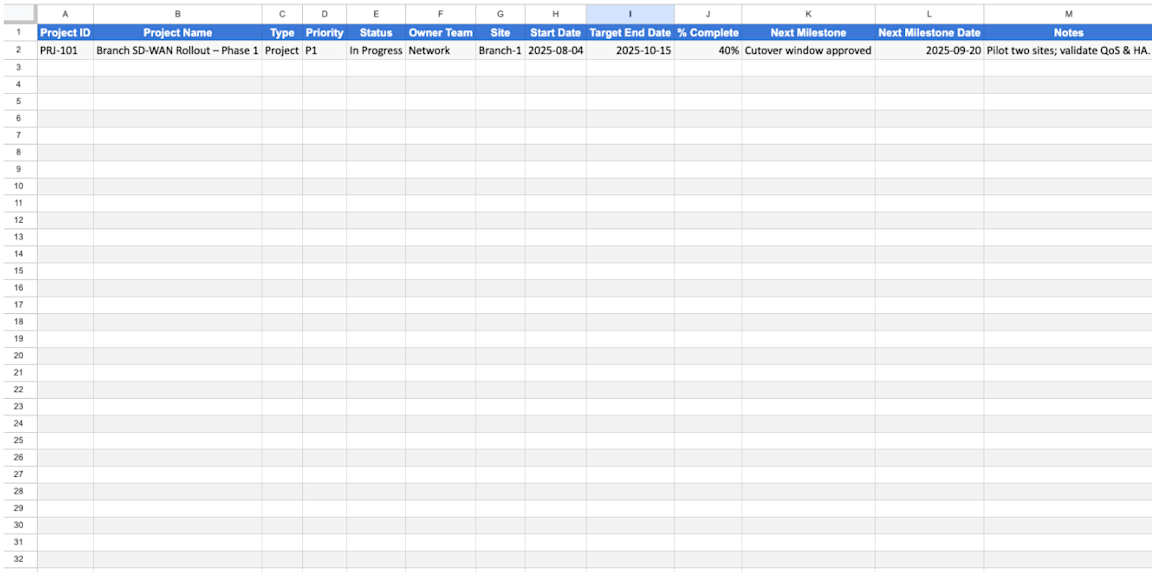
What this template includes:
Project portfolio basics: Project ID, Name, Type (Project/Maintenance), Priority, Status, Owner Team, Site, Start/Target End dates, % Complete, Next Milestone (+ date), Notes
Maintenance windows: Maintenance ID, Title, Site, Change Type, Risk Level, Window Start/End, Duration (hours)
A Better Way to Track and Manage Your Networks
While spreadsheets are easy to use and free, they're not the best way to document, track and manage your networks and devices:
Manual procurement across multiple sites: The templates require you to manually track each location's internet service separately. Let's say you need to add internet service to 20 new retail locations - you'll spend weeks creating individual RFPs, manually entering each site's details into your spreadsheets, and tracking vendor responses across dozens of email threads.
Static IP and network data scattered everywhere: Your IP Address Template captures important details, but keeping static IP assignments, subnet information, and network configurations updated across multiple sheets becomes impossible at scale. You might find that your IPv4 block information is outdated in one sheet while your device inventory shows different gateway settings in another.
Contract renewals fall through the cracks: While your Network Inventory Template includes contract end dates, spreadsheets can't automatically alert you when renewals are approaching. For example, you could miss a 90-day cancellation notice requirement and get locked into expensive auto-renewals.
No procurement optimization: The templates help you organize existing services but provide no intelligence for procurement decisions. When you need new circuits, you're making decisions without knowing which providers offer the best coverage and pricing for your specific locations.
This is where Lightyear can help.
Lightyear automates your telecom lifecycle with data-driven software, driving savings across procurement, inventory management, and bill payment.
Trusted by hundreds of enterprises, Lightyear:
Digitizes your system of record: Lightyear will organize an accurate digital record of every network service, vendor, and cost in your footprint, providing you fingertip access to 25+ data points per service and custom visualizations of your network.
Automates contract renewals and rebids: Gain transparency into contract details such as end dates, notice periods, and price escalations, with continuous cost optimization driven by automated re-bidding prior to any contract expirations.
Streamlines service workflows: Open MACD, billing issue, and SLA breach tickets across all vendors behind a single pane of glass and let Lightyear handle the rest. Create custom reports to analyze costs, services, locations, vendors, and much more in just a few clicks.
Achieve continuous ROI: Fulsome network visibility, automated rebids, annual telecom expense audits, and streamlined issue resolution will help you optimize network costs continuously (well in excess of industry deflation) and save a majority of the time you’d spend on tedious networking workflows.
Featured Articles
Want to learn more about how Lightyear can help you?
Let us show you the product and discuss specifics on how it might be helpful.
Stay up to date on our product, straight to your inbox every month.