2026 Network Inventory Spreadsheet for ISP Circuits [Free Template]
Stop hunting for ISP circuit / network info across multiple systems. This free network inventory spreadsheet centralizes everything you need in one place.

Jan 15, 2026
SHARE
Automate the telecom lifecycle
Get better quotes, launch sites faster, keep inventory accurate, and control spend.
When you can't track network services across all your locations, you miss crucial details at the worst times. Your IT team scrambles to find account IDs and support contacts during outages or discovers expensive multi-year auto-renewals after it’s too late to cancel them.
A good network inventory spreadsheet gives you clear visibility and helps you save money. Tracking all your circuits in one place means you'll quickly notice when offices have duplicative or unnecessary connections or when a remote site pays for more bandwidth than it uses. You'll also know exactly when to renegotiate contracts before they auto-renew.
Below, we'll provide a downloadable network / ISP circuit inventory spreadsheet template that you can customize for your company, plus practical tips for effective management of your network and essential data points to track. We'll also introduce you to a more efficient solution that automates telecom network inventory tracking and management.
Downloadable Template: Network Inventory Spreadsheet
This simple network inventory spreadsheet is available in both Google Sheets and Excel.
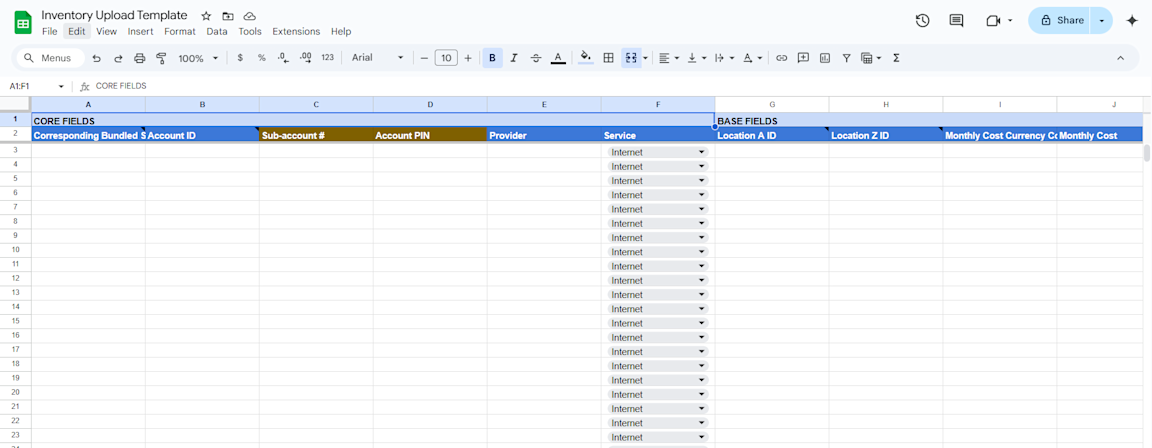
Grab the template in your preferred format and start populating it with your network infrastructure details. We recommend starting with your most critical assets and gradually expanding to include all network components.
What to Track in Your Network Inventory Spreadsheet
If you’re not ready for Lightyear just yet and want to continue tracking your network resources manually, here's what your spreadsheet should include:
Location Information: Track where each network service is installed. Include building addresses, floor numbers, and room locations for all equipment. For international sites, GPS coordinates help technicians find remote equipment quickly during service calls.
Service Identification: Document what makes each service unique. Record provider names, account numbers, sub-account IDs, and PIN codes for each connection. Having these details ready when you call support significantly reduces troubleshooting time.
Contract Details: Record when services start, end, and renew. Track notice periods and auto-renewal terms for each circuit. Monitoring these dates ensures you never miss a cancellation window and avoid paying for unwanted services.
Costs and Billing: Keep track of what you're spending. Record monthly recurring costs, one-time installation fees, currency codes, and any special charges like construction fees. Regular review of these items helps you spot billing errors and negotiate better rates.
Technical Specifications: Document what you're paying for versus what you're getting. Record download/upload speeds, hardware/device connection types, transport methods, and guaranteed service levels. Regular speed tests against these benchmarks confirm you're receiving what you're paying for.
Network Configuration: Capture all your IP details in one place. Include IP blocks, router addresses, gateways, and subnet masks for both IPv4 and IPv6. This documentation prevents configuration mistakes during network changes and helps new team members understand your setup.
Circuit Details: Track the physical aspects of your connections. Record circuit IDs, delivery points, last mile providers, and utilization rates. This information proves essential when managing service changes or troubleshooting connectivity issues.
Contact Information: Maintain a list of who to call when things break. Include vendor support numbers, account manager contacts, billing department information, and on-site personnel at each location. Having these contacts readily available significantly reduces resolution time during outages.
Maintaining these records gives you clear visibility into your network and helps prevent expensive surprises. While spreadsheets require manual updates, they at least provide a foundation until you're ready for an automated solution like Lightyear.
Continuously optimize your network
A Better Way to Track and Manage Your Network Inventory
Your IT team likely handles many internet and WAN connections from different ISPs. Without a central record of all that goes into your ISP circuits / telecom networks, you waste time and money trying to manage them.
Each vendor uses different systems, portals, and account structures. So if you have five different providers, that means five different websites to log into, five different support numbers to call, and five different billing systems to monitor.
Many IT administrators attempt to solve this problem with spreadsheets. While they're cost-effective and user-friendly, spreadsheets have significant limitations that compound as your network grows.
The Hidden Costs of Spreadsheet Management
Spreadsheets create several challenges that lead to wasted time and budget:
Manual updates eat up time. When you change a circuit, update an IP address, or renew a contract, someone must find and edit the right cell in your spreadsheet. This is a time-consuming process that can take hours each week and make any inventory updates prone to typing mistakes.
Critical alerts fall through the cracks. Spreadsheets lack built-in notification systems for approaching contract deadlines or service level violations. This makes your organization susceptible to financial risk through unexpected auto-renewals.
Network growth introduces scalability issues. What works for tracking a handful of circuits becomes unwieldy when managing dozens of locations and multiple vendors or services. As your organization grows, spreadsheets quickly become bloated and difficult to navigate.
Collaboration creates version control issues. Multiple team members accessing the same spreadsheet leads to conflicting edits, data duplication, and version-related confusion. With their limited access controls, Excel files make it particularly hard to keep network data secure.
Employee turnover intensifies data gaps. When key people leave the company, they often take critical knowledge with them. Without clear documentation, new team members face a steep learning curve to understand what telecom services exist, how they're configured, and when they're set to renew.
How Lightyear Transforms Network Operations
When it's time to graduate from spreadsheets, Lightyear offers a better solution.
Our Network Inventory Manager automatically tracks your telecom services and stores over 30 key details about each one (from contract details and static IPs to vendor SLAs and support contacts). So when you need to find the support contact for a down circuit, instead of having to dig through files or emails, you'd find it in seconds in our system.
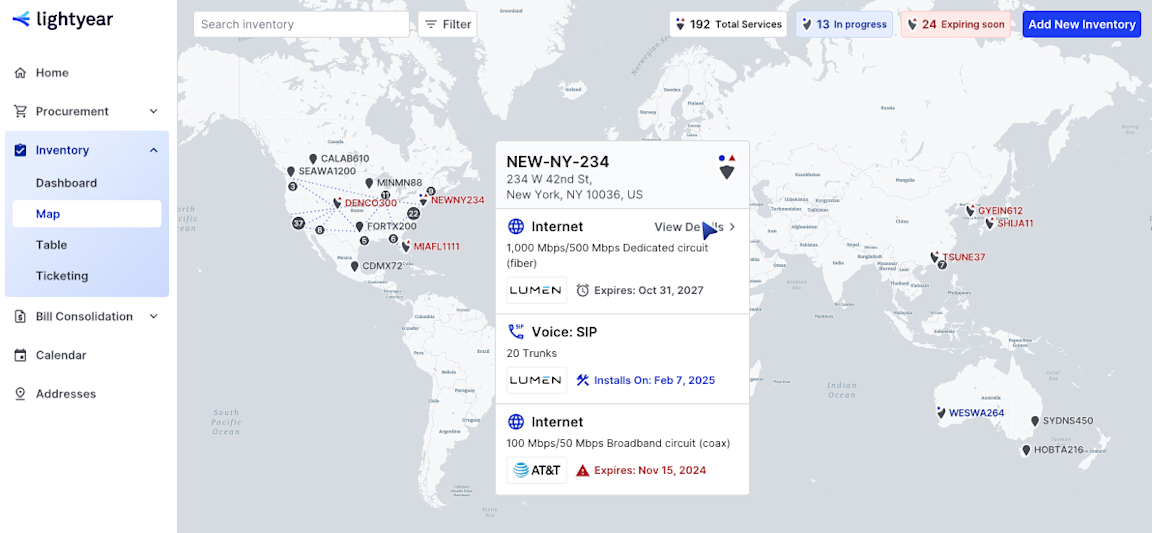
Trusted by 350+ enterprise customers, Lightyear is your single source of truth for network inventory management. Our visualizations reveal optimization opportunities that static spreadsheets hide. And our automated alerts warn you about contract renewals so you can rebid before notice periods expire or costly auto-renewals occur.
With Lightyear, you manage service changes, billing disputes, and SLA issues through a single interface rather than across multiple vendor portals. Plus, our platform generates custom reports to analyze costs, services, locations, and vendors in just a few clicks instead of requiring hours of spreadsheet manipulation.
Customers using Lightyear achieve 70% time savings and up to 20% annual cost reduction thanks to telecom management automation. Our annual telecom expense audit and ticket handling capabilities prevent overpayment, reduce billing complexities, and increase your return on investment.
Plus, our white-glove inventory onboarding process handles the data collection and organization. That means you create an accurate baseline without burdening your team, and you can finally ditch these time-consuming and error-prone IT inventory spreadsheets.
Featured Articles
Want to learn more about how Lightyear can help you?
Let us show you the product and discuss specifics on how it might be helpful.
Stay up to date on our product, straight to your inbox every month.