Everything You Need To Know About Colocation Data Centers
Colocation data centers are a core component of IT infrastructure, and in this guide we'll help you understand the key considerations when picking one.
Oct 1, 2025
SHARE
Automate the telecom lifecycle
Get better quotes, launch sites faster, keep inventory accurate, and control spend.
As businesses generate more data, they’re phasing out traditional on-site data centers. Many enterprises are switching to colocation data centers. The reason is simple: they offer scalability, security, and cost efficiency while supporting cloud adoption, SaaS apps, and connected devices.
Gartner recently proclaimed, “The data center is (almost) dead.” Specifically, they meant traditional, on-site data centers. According to Gartner, 80% of enterprises will shut down their traditional data centers by 2025, in favor of more agile solutions, such as colocation data centers.
Why? Because businesses need broader, more flexible networks to manage increasing amounts of data.
Think of all the software-as-a-service (SaaS) companies bringing apps into international user bases, or the number of smart devices continually transmitting data. A smart dishwasher has to send its food particle analysis somewhere.
With more data coming in from more places, it makes sense for businesses to lean on colocation data centers. These third-party facilities help information technology (IT) and network professionals design the network architecture their businesses need. Here’s what you need to know.
Data Center Definition
A data center is a physical building that houses businesses’ data and critical applications. Key hardware components found in data centers include:
Servers
Routers
Firewalls
Switches
Application delivery controllers
Cross connections
Data storage systems
Power supplies
Environmental controls (air conditioning, fire suppression)
Data centers can be “on-premise” and owned/operated by the company in charge of its servers, or “colocated” in a third-party-operated colocation data center.
Network engineers design data centers to facilitate the delivery of data and shared applications to their customers. Redundancy of data center resources (connectivity, power, cooling) is a top priority, as well as reliability (uptime, often dictated by service level agreements or SLAs).
What Are Colocation Data Centers?
A colocation data center is like a warehouse, operated by a third party, where you can store parts of your IT network. You rent space for your servers, routers, and other networking equipment. You set up and maintain control over your devices, while the colocation data center provider maintains an IT-optimized environment, including:
Power: Enough energy to operate your equipment, run the cooling and ventilation systems, and supply backup power in the event of a power outage;
Connectivity: Different types of lines from telecommunications and internet service providers (ISPs), supporting a broad range of storage and computing needs;
Security: This includes not only cybersecurity but also physical security to protect your data from criminals and natural disasters.
There are different types of colocation data centers. The most common are retail and wholesale.
Retail colocation refers to renting space at a data center serving multiple businesses. These are also called carrier hotels; picture the racks and cabinets as rooms, and your devices are the guests.
Wholesale colocation refers to leasing the whole data center. Whether retail or wholesale, colocation data centers are operated by third parties, as opposed to the data center definition noted above, which could fit “on-premise” or company-operated data centers.
Colocation data centers can give you an edge in scaling your IT network. This is especially true when intentionally planned as part of your wide area network (WAN).
Your software-based products and services need to be closer to your users and data sources. Colocation makes that possible.
Does Retail or Wholesale Colocation Fit Your Business?
Wholesale colocation is geared towards large enterprises, managed service providers (MSPs), and government agencies. Oftentimes, but not always, the tenant is responsible for handling much of the IT operations, such as deployment and management.
The right colocation model for your company depends on your IT infrastructure capabilities and needs. Companies with modest requirements and a small IT staff find retail a good fit. Businesses that rely heavily on technology and have large tech teams opt for wholesale services.
Why Businesses Are Making the Shift to Colocation
It’s becoming more common to hear industry experts talk about the decline of traditional, on-site data centers. That can sound alarming at first, but it doesn’t mean data storage is disappearing. Instead, the model for how businesses store and manage data is evolving.
Rather than keeping everything on site, many companies are moving toward colocation data centers. These facilities provide stronger infrastructure, more flexibility, and greater scalability. They provide value as businesses generate more data than ever before. From software-as-a-service applications to connected smart devices, every byte of data must be processed, stored, and secured.
Colocation data centers help businesses handle this challenge. They give organizations access to professional facilities without the massive expense and stress of building their own private data center.
Why Use a Colocation Data Center?
Colocation offers distinct advantages over other types of data centers, such as owned, managed, and cloud data centers. Colocation can also enhance these other types of data centers, giving businesses more freedom to build diverse, integrated networks.
For example, unified-communications-as-a-service (UCaaS) providers often build global networks. They use multiple data centers around the world.
That makes more stable voice-over-Internet (VoIP) connections over greater distances possible. Likewise, a business might decide to support only mission-critical services in its on-premises data center, and then place other parts of its network into colocation centers.
Colocation doesn’t have to replace traditional data centers. Instead, some businesses may find that colocation offers what they need to extend their existing network.
1. To Scale Your IT Infrastructure Faster and Cheaper
Building and operating your own data center is a huge investment, and it can mean sacrificing agility when pursuing rapid growth. According to leaders like JLL, enterprise-grade data centers cost millions of dollars to build. Tech giants like Facebook and Google have spent billions.
On top of that, it costs, on average, $10 million to $25 million per year to operate a data center.
Colocation data centers help companies slash this capital and operational expenditure (CapEx and OpEx). The space is already built, and other customers help shoulder operational costs, like power.
Data centers consume lots of energy, with most of that electricity going toward the cooling systems and servers. It's no surprise that many people are concerned about the environmental impact of data centers as they become more prevalent.
By keeping your costs down, colocation data centers help you keep cash flow as you scale your IT network. To make the most of that agility, look for colocation data centers that take a hands-on approach.
Vxchnge offers remote hands services from on-site IT experts who proactively fix problems, like restoring a server that goes down while you’re asleep. That way, you stay focused on the big-picture strategy instead of the day-to-day management.
2. To Guarantee Uptime for Mission-Critical Services
The increase in the number of SaaS companies and cloud applications has made “mission critical” synonymous with “always on” for many companies. That escalates the cost of downtime.
Atlassian points out how a 12-hour outage cost Apple $25 million in 2015 (more than $2 million per hour). Similarly, a 14-hour outage cost Facebook $90 million in 2019 (more than $6 million per hour).
Why are the costs so high? Because event tech can’t fail mid-event.
Video streaming can’t fail mid-meeting. When your network fails, your customers fail.
Colocation data centers protect uptime by distributing your IT network across more locations. That way, if one location goes down, another can take over. Think of it as an extra layer of disaster recovery.
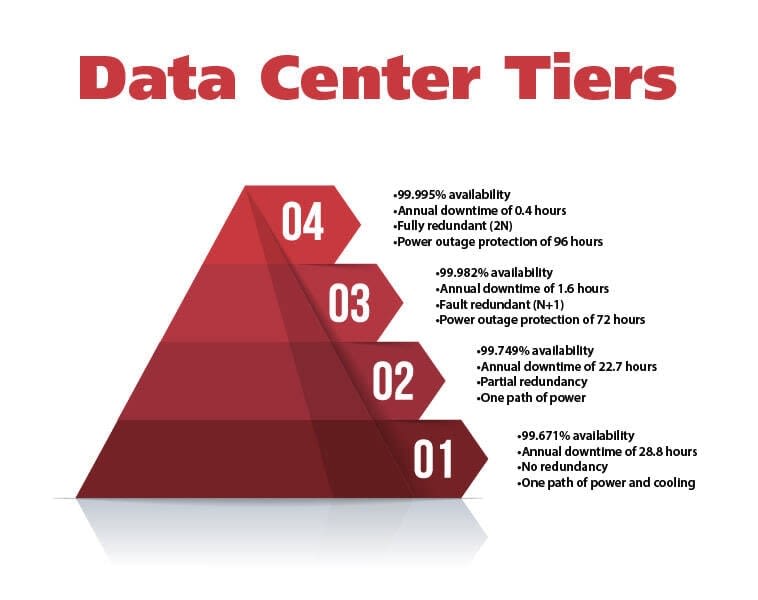
To guarantee your uptime, match your business needs with the right tier of data center. Each tier reflects standards defined by the Uptime Institute.
Tier 1, the most basic, allows up to 28.8 hours of downtime per year, but it doesn’t have to supply any redundancy. If something goes down, there’s no backup. That makes Tier 1 data centers good for businesses with basic services and those that need the most cost-effective solution.
Tier 4 is the most robust option. It allows up to 26.3 minutes of downtime per year, full 2N+1 redundancy (twice the amount of operational resources required, plus backup), and a minimum of 96 hours of power outage protection. This makes Tier 4 a better choice for businesses with mission-critical services that can’t fail.
3. To Physically Secure Your Data and IT Equipment
Traditional data centers centralize much of an IT network’s storage and computing on-premises. That brings some vulnerabilities.
Office buildings aren’t designed with a data center’s needs in mind, so the level of physical security your data needs might not be possible. A more centralized network can also raise your attack surface to threats like break-ins and natural disasters.
Meanwhile, colocation data centers factor security threats into their designs. According to Evoque Data Center Solutions, colocation centers should, at a minimum, adhere to industry standards for IT governance.
This includes some form of security operations center (SOC). It also includes ISO 27001.
Additionally, review how each colocation provider physically secures your data. Pay attention to details such as perimeter security, video surveillance, 24/7 guard presence 365 days a year, and biometric scanners.
4. To Test Your Products and Services for Cloud Fit
As Dell Technologies points out, not every application is ready for the cloud. Some applications are still just too sensitive to latency, or maybe they have heightened security risks. But Dell also notes how colocation data centers can help: by testing cloud fit.
Companies can use colocation data centers to create private clouds to test products and services on a limited basis. For example, a new tool might be tested with a select group of customers. By testing your product on a private cloud first, you validate whether it’s ready for the public cloud.
Look for colocation providers who understand how to support clients using hybrid clouds, both private and public. Check out their experience with cloud interconnects and their track record of working with top cloud providers, such as Amazon Web Services, Microsoft Azure, and IBM Cloud.
5. To Build an Edge Network
The proliferation of mobile apps and the Internet of Things (IoT) means networks need to connect with more always-on devices over greater distances. Colocation closes the gap between your network and its data sources by helping you build edge networks and support fog computing. The closer you bring your network to the source of its data, the faster and more securely you can process that data.
If you want to use colocation to help build out an edge network, then look for providers that understand how to support you. Secure access service edge (SASE) technology is a good sign. It helps secure your network, no matter where a user or device accesses it from.
Which Level of Redundancy Do You Need?
Not all data centers are created equal. The Uptime Institute, a globally recognized authority, created a four-tier classification system to define the level of reliability and redundancy a facility offers. Understanding these tiers is crucial for matching your business needs with the right provider and avoiding paying for resilience you don’t need—or worse, not having enough.
Tier I (Basic Capacity): This is the foundational level, offering no redundancy for its power and cooling components. It’s suitable for small businesses or development environments where downtime is not a major concern, as it allows for up to 28.8 hours of downtime per year.
Tier II (Redundant Components): A step up, Tier II facilities include redundant power and cooling components like UPS modules and chillers. While more resilient than Tier I, maintenance will still require downtime. This tier is a good fit for businesses that can schedule downtime but want protection from component failure, allowing for up to 22 hours of downtime annually.
Tier III (Concurrently Maintainable): This is often the sweet spot for most enterprises. A Tier III facility allows for any planned maintenance or equipment replacement to occur without disrupting operations. It offers N+1 redundancy, meaning it has everything needed for normal operations plus a full backup. It guarantees a maximum of 1.6 hours of downtime per year.
Tier IV (Fault Tolerant): This is the pinnacle of data center reliability, built for mission-critical systems that cannot fail. A Tier IV facility has 2N+1 redundancy—fully redundant, independently active systems—and can withstand a single, major equipment failure without any impact on operations. It promises no more than 26.3 minutes of downtime annually.
Other Types of Data Centers
We recommend that you understand the different flavors of data centers before choosing the best solution for your business.
On-site Data Center
Sited within a company's headquarters or campus, these data centers are relatively easy to maintain and access. Their proximity to company operations alleviates network troubleshooting, and they can readily be scaled up or down as needed, depending on the space and resources available. Another advantage of an on-site data center is that an organization can wield complete control over its data, bolstering network cybersecurity and compliance needs, such as the Health Insurance Portability and Accountability Act (HIPAA).
On the downside, the energy needed to run an on-site data center can overtax a building's existing power supply and cabling. Site maintenance can be prohibitively expensive. Additionally, on-site data centers pose a risk to your business continuity due to the concentration of data/resources in one local geography (unless backed up by a trusty DRaaS provider). For these reasons, many companies instead choose from one of the following alternatives.
Edge Data Center
Similar to an on-site data center and close to end users and their networks, an edge data center can be easily customized and scaled to meet the needs of its users. Like an on-site data center, an edge data center is generally owned by the organization that uses it, but operations are outsourced to an outside company.
Edge data centers are relatively small facilities compared to "server farms." To assure redundancy and user availability, they usually connect to multiple data centers or a larger fabric, such as those found in the Dulles Technology Corridor in Northern Virginia.
Hyperscale Data Center
Similar to colocation facilities, hyperscale (or cloud) data centers are owned and operated by platforms like Microsoft Azure. Microsoft Azure manages large-scale facilities that support global business needs.
Google Cloud also operates hyperscale centers. It gives enterprises access to powerful infrastructure.
Amazon Web Services (AWS) is another major provider, running massive data centers worldwide. They all serve multiple organizations, but on a far bigger scale.
Designed for rapid expansion and scalability, they may host thousands or even millions of servers, and will often reserve empty space for future expansion as well. The floor space of a hyperscale facility typically exceeds 10,000 square feet, and many are much larger.
Think of colocation data centers as data warehouses, while hyperscale data centers can be considered data distribution hubs. The biggest challenges for hyperscale facilities are cooling (their highest expense), server workloads, and electrical power distribution and availability.
Telecom Data Center
As its name indicates, a telecom data center is owned and operated by telcos such as AT&T or Verizon. Delivering massive connectivity, these facilities provide mobile services, cloud services, and content delivery. Telco personnel install and manage these centers. Some telecom data centers offer colocation services to customers.
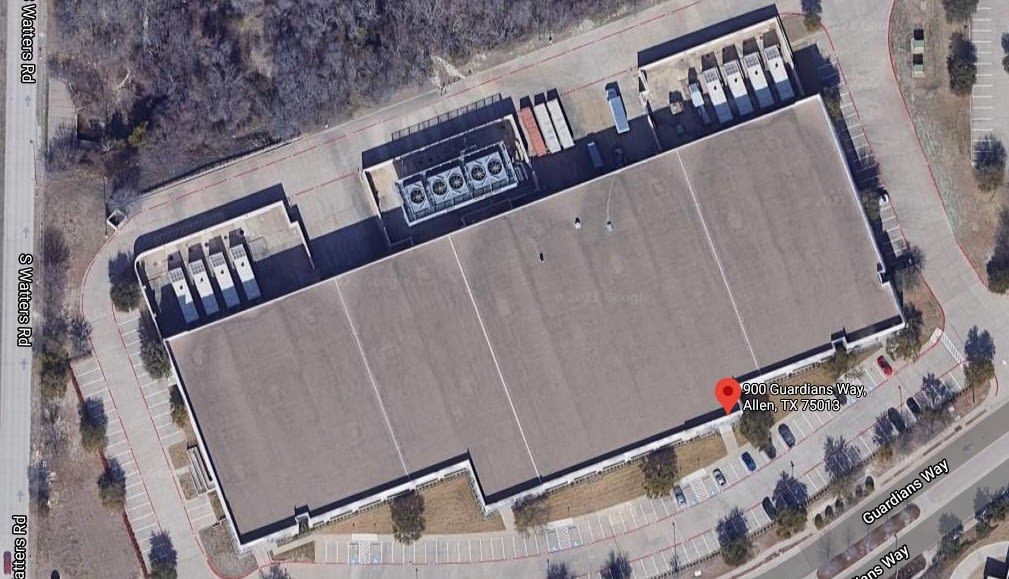
To appreciate how large these facilities can be, see this overhead view of AT&T's data center in Allen, TX (a Dallas suburb) below. Note the HVAC equipment at the top of the image. Wind turbines also provide power to this facility.
Continuously optimize your network
How Does Colocation Data Center Pricing Work?
There is a lot of variability in pricing for colocation data centers. To start, every company has unique IT and networking needs. On top of that, colocation centers price themselves differently.
This combination of market conditions makes finding and pricing colocation data centers as difficult as buying telecom services.
That said, there’s still information available to help you understand what to expect. Looking at Atlanta-based colocation provider Digital Services Consultants’ colocation pricing guide, we can broadly categorize colocation costs as including the following:
Space: The cost of the actual physical space you need, starting with racks and going up to more spacious options, like cabinets, cages, and suites.
Power: The cost of the energy required to keep your network running and maintain the optimal climate for your IT equipment.
Connection: The cost of the bandwidth that the data center allocates to your network.
For connection, this might include the connection between the data center and your network, such as a VPN. Businesses often choose different options depending on their security, performance, and budget needs. Another option is a dedicated Internet access (DIA) line.
That’s not an exhaustive list, nor should you expect all providers to price their services the same way. Generally, there will be some kind of setup fee.
Also, expect to navigate different levels of support. Some providers take a hands-off approach, and some treat colocation like a managed service, offering premium support options.
The location of a data center affects cost, too. Proximity to large populations, related infrastructure, weather activity, and even terrorist vulnerability are all drivers of colocation pricing.
Take Northern Virginia, also known as Data Center Alley. Access to Dominion Virginia Power and the Potomac River makes the cost per megawatt 20% lower than the U.S. average.
Such variability is why Digital Services Consultants estimate the cost of one rack unit (1.75 inches of vertical space) at $40 to $100 in Miami, but $75 to $300 in New York. That’s up to a 200% jump in cost.
Given all this variability in colocation pricing, it’s important that the data center you choose practices transparent pricing with itemized costs. This will protect you from surprise fees.
Finding the Right Provider: What to Look For
With so many colocation data centers to choose from, it can be tricky to know which one meets your business needs exactly. To move from planning to execution, you need a partner, not just a landlord. Focus on these critical determining factors when evaluating providers.
1. Service Level Agreements (SLAs)
The SLA is your contractually guaranteed uptime. Don’t just look for a high number; understand what it means. A provider offering a 99.999% uptime SLA (the "five nines") is promising no more than 5.26 minutes of downtime per year. Ask for the provider’s track record and how they compensate you if they fail to meet the SLA.
2. On-Site Support and "Remote Hands"
Your servers are in their building, but you're still responsible for them. What happens when a server needs a reboot at 3 a.m.? High-quality providers offer "remote hands" services, giving you access to their on-site expert technicians 24/7/365. This service is critical for handling emergencies without requiring your team to drive to the facility.
3. Network and Cloud Connectivity

A data center is only as good as its connections. Look for a "carrier-neutral" facility, meaning it has connections to multiple internet service providers (ISPs) and major carriers. This gives you choice and redundancy. Also, ask about their direct cloud on-ramps to services like AWS, Microsoft Azure, and Google Cloud, which are essential for any hybrid cloud strategy.
4. Security and Compliance Certifications
Physical and digital security are non-negotiable. At a minimum, look for multi-factor biometric access, 24/7 video surveillance, and on-site security staff. Beyond that, verify their compliance certifications. If you're in healthcare, you need HIPAA compliance. For finance or SaaS, SOC 2 Type II is the standard. A serious provider will proudly display their certifications and support you during audits.
5. Scalability and Flexibility
Your business will grow, and your provider should be able to grow with you. Ask about the process for scaling your footprint. How easy is it to add another rack or expand into a private cage? A true partner will offer flexible contracts and a clear path for expansion without forcing a painful migration to a new facility.
What to Look for in a Colocation Agreement
You've vetted the providers and toured the facilities. Now comes the most critical part: the contract. The sales pitch is over; the real promises are written in the Master Service Agreement (MSA) and the Service Level Agreement (SLA). This is where you win or lose. Before you sign, interrogate the fine print on these key areas:
SLA Remediation
Don't just look at the uptime percentage (e.g., 99.999%). Look for the "remedy" or "credit" clause. What exactly do you get if the provider fails to meet that guarantee? A credit of a few hundred dollars is meaningless if an hour of downtime costs you tens of thousands. The penalty should be painful enough to ensure the provider makes uptime their absolute priority.
Power and Connectivity Costs
Understand exactly how you're paying for power. Is it a fixed price per circuit ("per amp"), or is it metered usage like a utility bill? For connectivity, clarify the costs for "cross-connects"—the physical cables that link your equipment to your chosen carriers. These can be a significant hidden monthly expense.
"Remote Hands" Policies
Your contract should clearly define the scope and cost of on-site support. Is a certain number of hours included per month? What are the hourly rates for emergency support after hours or on weekends? A simple server reboot at 3 AM can become incredibly expensive if the terms aren't clearly defined.
Scalability and Exit Clauses
Your business is going to grow, so how does the contract grow with you? Clarify the process and costs for adding more rack space or power. Conversely, what happens if you need to leave? Understand the contract term, the penalties for early termination, and the provider's obligations for helping you move your equipment out.
Your Colocation Checklist: A Step-by-Step Guide
A successful transition from on-site to a colocation data center requires a clear game plan to minimize downtime and avoid costly mistakes. Here is your checklist to ensure a smooth migration.
1. Audit Your Current Infrastructure
Before you can shop for a new home, you need to know exactly what you're moving. Create a complete inventory of your servers, storage arrays, and networking gear. Document your current power consumption (in kilowatts), bandwidth usage, and physical space requirements (measured in rack units or "U's").
This data is non-negotiable; it's the foundation of every decision that follows.
2. Vet Potential Providers Thoroughly
With your audit in hand, you can start scouting providers. Go beyond the marketing brochures. Ask for their track record on the Service Level Agreement (SLA) you need. Verify their compliance certifications (like SOC 2, HIPAA, or ISO 27001).
Most importantly, schedule a virtual or in-person tour. Seeing the facility's security measures, cooling infrastructure, and cable management with your own eyes tells you more than any sales pitch ever will.
3. Develop a Detailed Migration Plan
Once you've chosen your provider, map out the entire move. Will you migrate everything at once over a weekend (a "lift and shift"), or move applications in phases to reduce risk? Assign specific roles to your IT team members.
Coordinate with the data center's "remote hands" support team so they're ready to assist the moment your equipment arrives. Your plan should have a detailed timeline, a communication strategy for stakeholders, and a clear rollback plan in case of an emergency.
4. Execute and Test Relentlessly
On migration day, execute your plan with precision. Once your equipment is racked and powered on, the work isn't over. The final, critical step is to test everything.
Verify your network connections, check your application performance, and confirm that all data backups and redundancies are functioning as expected in the new environment. Don't assume anything works—prove it.
FAQs
Is colocation only for big companies?
No, colocation isn’t just for big companies. Plenty of smaller businesses use colocation.
It’s perfect for accessing professional-grade facilities without having to worry about the expense of running their own data center. The great thing about colocation for companies of all sizes is that they can stay on par with larger enterprises. By improving their reliability and security, they’re ensuring their businesses are better prepared for growth.
How do I know if colocation is right for us?
The first thing you should do is look at your business’s current pain points and ask questions, such as: Do you have unpredictable cloud bills? Is downtime affecting your customers? Is your in-house equipment difficult to manage?
If you’ve answered yes to any of these questions, then you may want to consider colocation. It’s excellent if you want more control than the cloud currently offers, but don’t want the additional hassle of building and managing an on-site data center.
How long does migration take?
Migration varies based on several factors. If you’re just moving a few servers to a colocation data center, it might take only a couple of weeks. However, if you’re a large enterprise with a significant number of servers, the migration could take months.
To ensure everything runs smoothly, always create a plan well in advance. This includes testing migration in small steps and avoiding the urge to rush.
What compliance standards should we look for?
At a bare minimum, any colocation provider should follow an industry-recognized security framework. If your business is in healthcare, finance, or operates globally, look for providers with additional certifications that fit those sectors. Don’t hesitate to ask how the provider stays compliant and whether they’ll support you during audits.
Is colocation cheaper than cloud?

If you’re comparing costs across predictable workloads, then yes, colocation is often cheaper than cloud. Cloud excels at flexibility, but that flexibility can get expensive at scale. Colocation helps keep costs steady while allowing you to fully own your hardware.
Many businesses choose to use both: cloud for agility and colocation for cost stability.
How secure are these facilities compared to our office servers?
In nearly every case, colocation facilities are more secure. They’re built with security in mind, offering multiple layers of physical and cyber protection. Most office environments simply don’t have this level of infrastructure, giving colocation facilities a clear advantage.
Can colocation work with cloud strategies?
Yes. Many colocation data centers work directly with major cloud providers. This makes them ideal for hybrid setups, giving you the best of both worlds: flexibility from the cloud and reliability from colocation.
What hidden costs should we ask about?
When comparing providers, always ask about common extras. These often include:
Cross connects
Extra bandwidth
Support services
Also, request a detailed, itemized pricing list from each provider. This ensures you know exactly what you’re paying for and helps you avoid surprise charges.
Where To Find the Right Colocation Data Centers
If your business is ready to process and store data faster and more securely, it’s time to invest in colocation data centers. This is preferable to relying solely on an in-house data center and offers competitive advantages. Even better, you’ll benefit from lower costs and more guaranteed uptime.
Finding the right colocation data center doesn’t have to be an odyssey through complicated pricing. Lightyear can help you think through decisions on power, connectivity, pricing, and much more. Schedule your demo today and start saving on data center costs.
Featured Articles
Want to learn more about how Lightyear can help you?
Let us show you the product and discuss specifics on how it might be helpful.
Stay up to date on our product, straight to your inbox every month.