EE Smart Router vs Hub: Enterprise Comparison
Confused by EE Smart Router vs. Smart Hub? We break down the key differences in features, performance, and use cases for business network buyers.

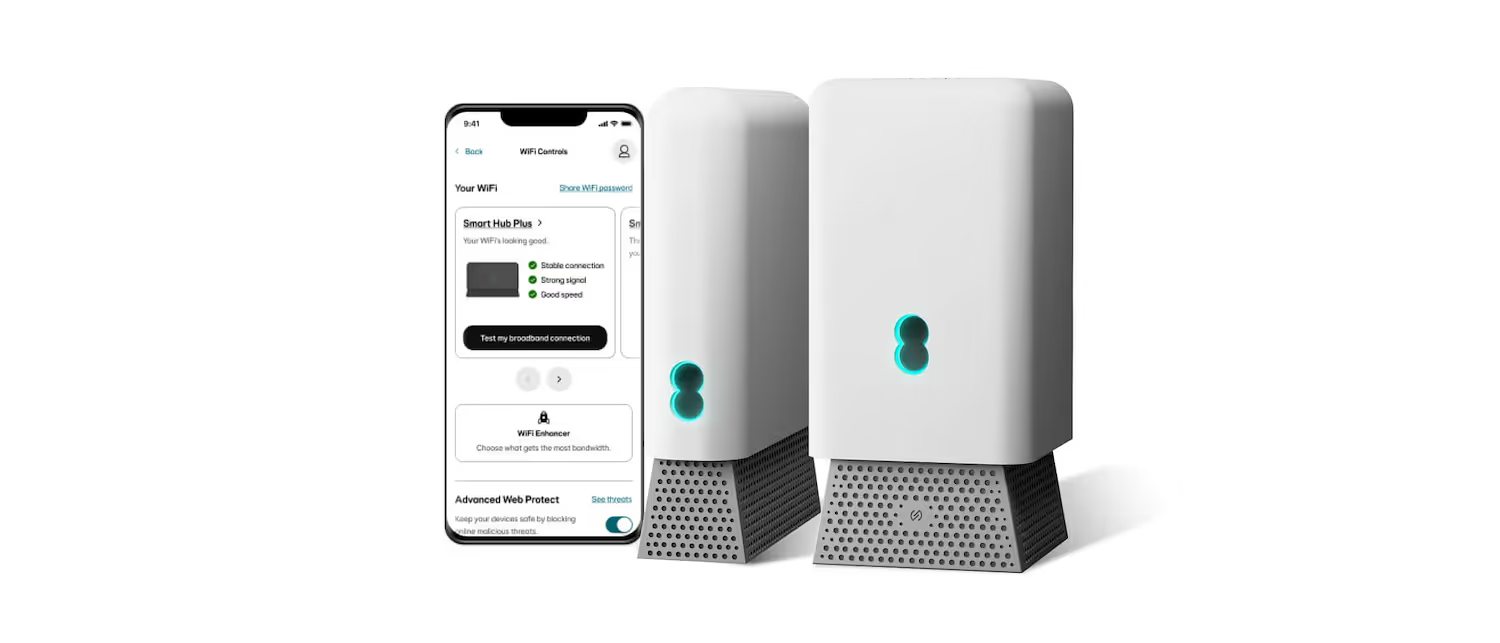
When choosing a connectivity solution from EE for your business, you'll likely encounter two key pieces of hardware: the EE Smart Router and the EE Smart Hub.
While their names are similar, they are distinct devices with different capabilities and intended use cases.
This guide offers a straightforward comparison to help IT and network managers understand the specific features of each, making it easier to select the right equipment for your company's needs.
What is the EE Smart Router?
The EE Smart Router is the standard piece of equipment provided with most of EE's fibre broadband packages. It’s a capable and straightforward device designed to handle the essential connectivity demands of a small to medium-sized business or home office environment without complex setup.
Its core function is to deliver reliable internet access for everyday business operations. Key features generally include:
- Wi-Fi Technology: It operates on the Wi-Fi 5 (802.11ac) standard, offering dependable wireless speeds suitable for video conferencing, cloud applications, and general web browsing.
- Dual-Band Operation: The router uses both 2.4GHz and 5GHz bands. It automatically connects devices to the optimal frequency, which helps manage network traffic and reduce interference.
- Wired Ports: It is typically equipped with four Gigabit Ethernet ports, providing fast and stable wired connections for essential hardware like desktop computers, printers, or network-attached storage.
- Smart Channel Switching: The router intelligently scans for Wi-Fi congestion from nearby networks and can automatically switch channels to ensure a more stable and consistent connection.
What is the Smart Hub?
The EE Smart Hub is the upgraded, more powerful router offered with EE's higher-tier broadband packages, such as their full fibre plans. It is engineered for businesses with more demanding connectivity needs, including larger offices or environments with a high density of connected devices.
While it shares the goal of providing reliable internet, its hardware and features are a step up from the standard router. Its primary enhancements include:
- Advanced Wi-Fi Standard: The Smart Hub typically supports Wi-Fi 6 (802.11ax). This newer technology is designed to handle more connections at once, reduce network congestion, and deliver faster speeds, which is crucial for a busy office environment.
- Mesh Network Capability: It is the core component of EE’s Complete Wi-Fi guarantee. The hub works with smart Wi-Fi extenders to create a single, seamless mesh network that provides strong coverage across the entire premises.
- More Powerful Internals: The Smart Hub is built with a more capable processor and additional memory, enabling it to manage network traffic from many more devices simultaneously without performance degradation.
- Enhanced Security: It often includes more advanced security features, such as WPA3 encryption, offering a more robust defense against network intrusions.
Key Differences Between EE Smart Router and Smart Hub
While both devices provide internet access, their intended use cases and underlying technology create several important distinctions for business buyers.
1. Associated Broadband Plans
The most immediate difference is how you get them. The EE Smart Router is the standard equipment included with most of EE’s fibre-to-the-cabinet (FTTC) broadband packages.
The EE Smart Hub, on the other hand, is typically supplied with higher-tier plans, such as full fibre-to-the-premises (FTTP) connections, which demand more capable hardware.
2. Core Wi-Fi Technology
The Smart Router operates on the Wi-Fi 5 (802.11ac) standard. This technology provides reliable connectivity for typical office tasks.
In contrast, the Smart Hub uses the more advanced Wi-Fi 6 (802.11ax) standard. Its primary advantage is its efficiency in handling a high density of connected devices simultaneously, which helps reduce network congestion in a busy office.
3. Network Scalability and Coverage
The Smart Router is a standalone device, providing a single point of Wi-Fi access. Its range is determined by the router's placement and any physical obstructions.
The Smart Hub is built for scalability. It is the central component of EE’s Complete Wi-Fi service, designed to work with mesh extenders to form a single, unified network across a larger property.
4. Internal Hardware and Device Capacity
Under the hood, the Smart Hub is equipped with a more powerful processor and additional memory compared to the Smart Router.
This hardware advantage means it can manage data traffic from a much larger number of concurrent users and devices without performance issues, preventing it from becoming a network bottleneck.
Performance and Speed Comparison
When evaluating performance, the key distinction lies in how each router handles network traffic, especially in a busy commercial environment. While both deliver fast speeds, the Smart Hub is engineered to maintain that performance under greater strain.
- Wireless Speed and Capacity: The Smart Hub’s Wi-Fi 6 technology offers higher theoretical speeds and, more importantly, excels at managing multiple simultaneous connections without significant performance loss. The Smart Router’s Wi-Fi 5 is reliable for standard business use but can experience slowdowns as more devices connect and compete for bandwidth.
- Latency: For real-time applications like VoIP calls and video conferencing, the Smart Hub typically provides lower latency. This results in smoother, more stable communications, which is a critical factor for many businesses.
- Wired Connections: On the wired front, performance is nearly identical. Both routers are equipped with Gigabit Ethernet ports, ensuring that essential hardware like desktop computers, servers, or printers receive a fast and stable connection.
- Congestion Management: The Smart Hub’s most significant performance advantage is its efficiency in congested areas. It is designed to handle a high density of devices, making it the superior choice for larger offices or spaces with numerous Wi-Fi-enabled gadgets.
Security Features and Benefits
When it comes to protecting your network, both routers provide essential security, but the Smart Hub offers a more modern defense. The key differences lie in the encryption standards and how they protect against potential threats.
- Encryption Standards: The Smart Hub’s main advantage is its support for WPA3 security. This is the latest encryption protocol, offering more robust protection against password-guessing attempts and strengthening overall network security. For a business, this means a tougher barrier against unauthorized access.
- Standard Protection: The EE Smart Router uses the WPA2 standard. While still secure and widely used, WPA2 is an older protocol and does not have the same advanced protective features found in WPA3. It provides a solid baseline of security suitable for standard business needs.
- Automatic Updates: Both the Smart Hub and Smart Router receive automatic firmware updates directly from EE. This is a critical feature for any business, as it means security patches for new vulnerabilities are applied without needing manual intervention from your IT team.
Installation and User Experience
Both the EE Smart Router and Smart Hub are designed for a straightforward setup process, minimizing the need for extensive technical intervention. The goal is to get your business connected with minimal downtime.
For the EE Smart Router, installation is a simple plug-and-play affair. You connect it to your line and power source, and it's ready to go. This makes it ideal for single-site offices or businesses that need a quick, no-fuss deployment.
The EE Smart Hub follows a similarly simple initial setup. However, the user experience expands if you are using its mesh capabilities with EE’s Complete Wi-Fi service. This involves the additional step of strategically placing one or more Wi-Fi extenders around the premises to ensure seamless coverage. While this requires a bit more thought, the process is guided and user-friendly.
Once running, both devices are managed through an app, allowing IT teams to monitor status and adjust basic settings easily. The primary difference in experience comes down to scale: the Smart Router is a single-point solution, while the Smart Hub is about managing a broader, more robust network.
Making the Right Choice for Your Business
Ultimately, the decision between the EE Smart Router and the Smart Hub comes down to your business's specific operational scale and connectivity demands.
The EE Smart Router is the practical, reliable choice for smaller offices or businesses with straightforward internet needs. It provides solid performance for essential tasks without unnecessary complexity.
In contrast, the EE Smart Hub is the better option for larger premises or companies with a high density of connected devices. Its Wi-Fi 6 technology and mesh capabilities are built to handle network congestion and provide consistent coverage across a wider area.
Consider your current team size, the number of devices on your network, and your plans for future growth. Your answer will point you directly to the right hardware for your needs.
Need Help Managing Your Network? Lightyear Can Help

Choosing the right hardware is just the first step. Lightyear helps you manage the entire telecom lifecycle by automating service procurement, inventory, and billing for whichever EE plan you select.
By taking the pain out of infrastructure management, enterprises using Lightyear achieve over 70% time savings and 20% cost savings on their network services.
Schedule a demo or get started with our questionnaire today.
Frequently Asked Questions about EE Smart Router vs Smart Hub
Can I upgrade from the Smart Router to the Smart Hub?
Yes, an upgrade is usually possible. It typically requires moving to a higher-tier broadband plan that includes the Smart Hub. Contacting EE directly is the best way to explore the specific upgrade path and plan changes available for your business account.
Is the Smart Hub compatible with older Wi-Fi devices?
Absolutely. The Smart Hub's Wi-Fi 6 technology is fully backward compatible with older standards like Wi-Fi 5. Your existing equipment will connect seamlessly, though it won't be able to access the maximum performance benefits exclusive to Wi-Fi 6 devices.
Can I use my own third-party router with EE broadband?
While you can use your own router, it requires manual configuration and you'll lose access to EE-specific features like the Complete Wi-Fi service and dedicated hardware support. For most businesses, sticking with the provided equipment ensures simpler management and troubleshooting.
Does the Smart Hub cost more than the Smart Router?
The hardware is tied to your service plan. The Smart Hub is included with premium full fibre packages, so while there isn't a separate fee for the device, the monthly cost of the associated plan is higher than those that come with the Smart Router.
Let us show you the product and discuss specifics on how it might be helpful.
Schedule a Demo





Revolutionize Your Telecom Experience
Learn how you can get one step closer to optimal business efficiency for all your telecom services.
