Mesh Router vs Regular: Enterprise Network Solutions
Mesh vs. regular router for your enterprise network? Learn the key differences in coverage, performance, and management to choose the right solution.

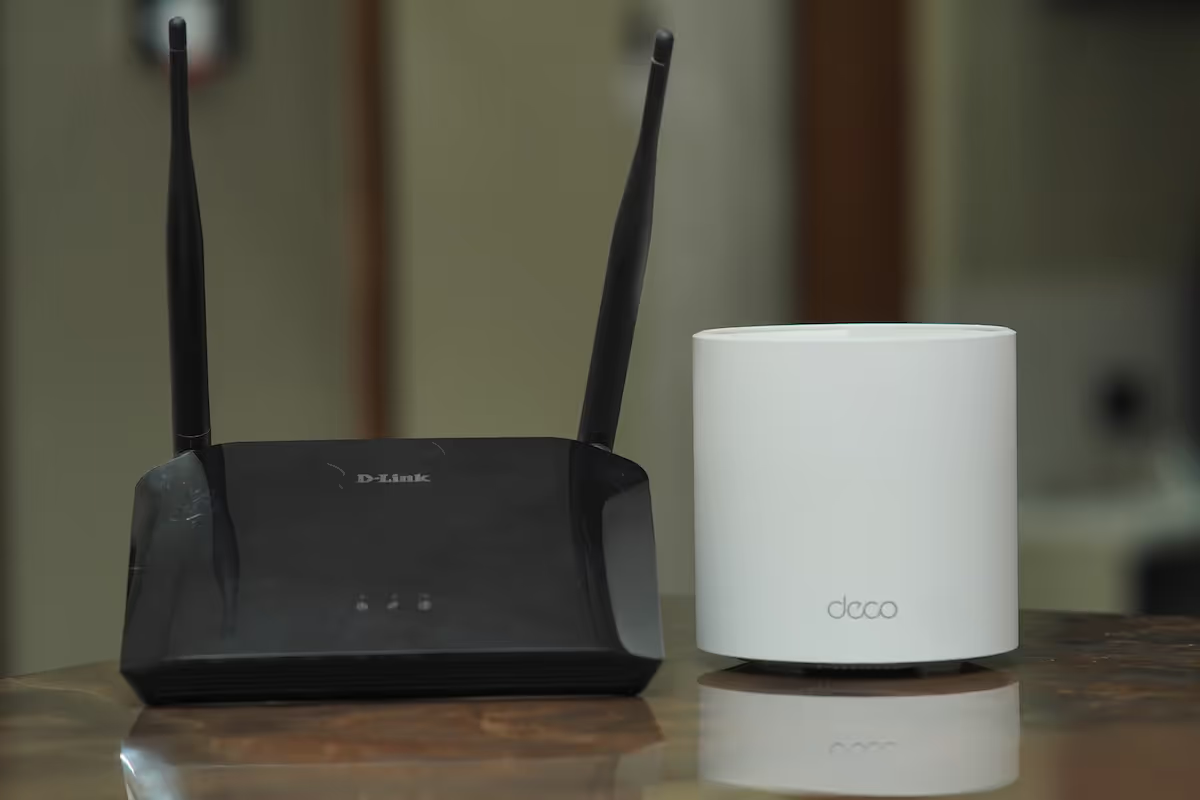
Selecting the right Wi-Fi infrastructure is a foundational decision for any enterprise, directly influencing network performance and reliability.
The choice often comes down to two distinct architectures: a traditional, single-point regular router or a multi-point mesh system.
This article breaks down the key differences between them to help you determine which solution best fits your organization's needs.
What is a Mesh Router?
A mesh router system uses a group of devices that work together to create a single, unified Wi-Fi network. Instead of relying on one router, a mesh system uses multiple access points, or "nodes," placed throughout a space to provide consistent coverage over a large area.
- System of Nodes: A mesh network consists of a main router that connects to your modem and several satellite nodes placed in different locations to extend the signal.
- Single Unified Network: All nodes broadcast a single network name (SSID). This allows devices to automatically connect to the node with the strongest signal as you move around, without interruption.
- Intelligent Connectivity: The nodes communicate with each other, not just with the main router. This creates multiple pathways for data, allowing traffic to be routed efficiently.
- Scalable Coverage: You can expand the network’s reach by simply adding more nodes, which is useful for large offices or buildings with complex layouts.
What is a Regular Router?
A regular router, often called a traditional router, operates as a single, central access point for your Wi-Fi network. It connects to your modem and broadcasts a wireless signal from its physical location, creating a localized area of coverage.
- Single Broadcast Point: All wireless traffic flows through this one device. Your connection quality is directly related to your proximity to the router and any physical barriers, such as walls or floors, that might obstruct the signal.
- Fixed Coverage Area: The router provides coverage within a specific radius. In larger spaces or multi-story buildings, this can result in "dead zones" where the signal is weak or unavailable.
- Centralized Control: Network settings, security, and device management are all handled through the router's single administrative interface.
- Range Extenders: To expand coverage, you can add Wi-Fi range extenders. These devices capture and rebroadcast the signal but may operate on a separate network name (SSID) and can sometimes reduce overall network speed.
Key Differences Between Mesh Routers and Regular Routers
While both get you online, their designs create key differences in performance, scalability, and cost.
Coverage and Performance
A mesh system provides consistent performance across a large area. Because all nodes communicate with each other, data has multiple paths, which prevents bottlenecks and maintains speed.
With a regular router, signal strength and speed decrease with distance. All traffic flows through one device, which can slow down the network during heavy use.
Scalability
Expanding a mesh network is straightforward; you just add more nodes. They integrate into the existing system automatically, extending coverage seamlessly.
To extend a regular router’s signal, you need range extenders. These often create separate networks and can cut bandwidth, degrading performance.
Management
Mesh systems offer unified management, typically through a single mobile app. This allows you to control the entire network from one place.
A regular router is managed through its own interface, but extenders usually require separate configuration. This can make network-wide administration more complicated.
Cost
Mesh systems generally have a higher upfront cost since they include multiple devices.
A single router is often cheaper initially. However, the total expense can grow if you need to buy several extenders to get adequate coverage.
Benefits of Using Mesh Routers
Mesh systems offer several distinct advantages that are particularly valuable in a business environment, moving beyond just basic connectivity.
- Consistent Coverage Everywhere: One of the most significant benefits is the elimination of Wi-Fi dead zones. In offices with multiple floors, thick walls, or sprawling layouts, a mesh network delivers a strong, reliable signal in every corner, from the conference room to the break room.
- Simplified Central Management: IT teams can manage the entire network from a single dashboard. This simplifies tasks like applying security updates, monitoring device connections, and troubleshooting issues without needing to configure individual access points separately.
- Greater Network Resilience: Mesh networks are inherently self-healing. If one node fails or becomes disconnected, the system automatically reroutes data traffic through the nearest available node. This redundancy minimizes downtime and keeps your business operations running smoothly.
- Automatic Load Balancing: The system intelligently distributes network traffic across different nodes. This prevents any single access point from becoming overloaded, which is critical in busy offices with many users and devices all demanding bandwidth at the same time.
- Flexible and Scalable Installation: Adding coverage is as simple as plugging in a new node. Since nodes communicate wirelessly with each other, you don't need to run ethernet cables to every point, offering a cleaner and more flexible installation process as your business grows.
Advantages of Regular Routers
While mesh systems excel in large, complex spaces, traditional routers still hold their ground with several key advantages, especially in specific business contexts.
- Cost-Effective for Defined Areas: For smaller offices, single-floor layouts, or dedicated work zones, a single, powerful router is often the most economical solution. It requires a lower upfront investment and can deliver excellent performance within its intended range, avoiding the higher cost of a multi-node mesh kit.
- Straightforward Management: With only one device to configure and maintain, administration is simplified. IT teams can manage all settings—from security protocols to access controls—through a single, familiar interface without worrying about the placement and connectivity of multiple nodes.
- Potentially Higher Peak Performance: For stationary devices located near the router, a direct connection can offer maximum throughput and lower latency. Since data doesn't have to hop between nodes, a high-end traditional router can provide top-tier speed for critical workstations or servers.
- Advanced Configuration and Control: Many regular routers offer deep customization options that appeal to technical users. This includes granular Quality of Service (QoS) settings to prioritize traffic, robust VPN server capabilities, and support for third-party firmware that unlocks even more functionality.
- Self-Contained Operation: Unlike many mesh systems that rely on cloud-based accounts for management, most traditional routers can be fully configured and managed on a local network. This provides an added layer of security and privacy, as it doesn't require external connectivity for administration.
Choosing the Right Router for Your Enterprise
Making the right choice comes down to evaluating your specific business environment and operational needs. Consider these key factors to guide your decision.
1. Evaluate Your Physical Space
The size and layout of your office are the most important considerations. A regular router is sufficient for a smaller, single-floor space with an open plan.
If your office is large, has multiple floors, or contains signal-blocking materials like concrete walls, a mesh system is necessary to provide consistent coverage.
2. Consider User Density and Device Load
Think about how many people and devices will connect to the network simultaneously. A mesh system is built to handle high-density environments by distributing the load across multiple nodes.
A regular router may become a bottleneck in a busy office with many active users, slowing down connectivity for everyone.
3. Assess Your IT Management Needs
Your team's preferred management style matters. Mesh systems offer simplified, centralized control through a single interface, which is ideal for quick administration across multiple locations.
High-end regular routers often provide more granular control and advanced configuration options for teams that require deep technical customization of a single point.
4. Plan for Future Growth
Consider your company's future plans. If you anticipate expanding your office space or increasing your headcount, a mesh network offers simple, plug-and-play scalability.
Extending a regular router’s network with extenders is less efficient and can degrade performance over time.
Final Thoughts on Mesh vs Regular Routers
The decision between a mesh and a regular router comes down to your specific business environment. There is no single "best" option, only the right fit for your needs.
A mesh system is designed for large, complex spaces with many users, providing consistent coverage and simple scalability. It excels where signal reliability across a wide area is the top priority.
A regular router remains a strong, cost-effective choice for smaller, defined areas. It offers straightforward management and can deliver high performance when coverage demands are limited. Your choice should balance your office layout, user density, and budget.
Need Help Managing Your Network? Lightyear Can Help

Choosing the right router is just the first step. The next challenge is procuring and managing the network services that power your hardware, regardless of the system you choose.
By automating network service procurement, inventory management, and bill consolidation, Lightyear takes the pain out of telecom infrastructure management. The hundreds of enterprises who trust Lightyear achieve 70%+ time savings and 20%+ cost savings on their network services.
Schedule a demo or get started with our questionare today.
Frequently Asked Questions about Mesh Router vs Regular
Can I mix mesh nodes from different brands?
Generally, no. Mesh systems are designed as proprietary ecosystems. For reliable performance and seamless management, it's best to use nodes from the same manufacturer as your primary mesh router.
Does a mesh network require a wired connection between nodes?
Not usually. Most mesh systems use a wireless backhaul for node-to-node communication. However, many support an optional wired Ethernet backhaul, which can increase speed and stability if your building has existing network cabling.
Is a mesh system less secure than a regular router?
Security levels are comparable. Both support modern encryption like WPA3. A network's security depends more on keeping firmware updated and proper configuration, not whether it's a mesh or regular system.
Let us show you the product and discuss specifics on how it might be helpful.
Schedule a Demo





Revolutionize Your Telecom Experience
Learn how you can get one step closer to optimal business efficiency for all your telecom services.
