Router vs Mesh System: Enterprise Network Solutions
Router or mesh system for your business? Understand the key differences in network coverage, performance, and management for your enterprise locations.

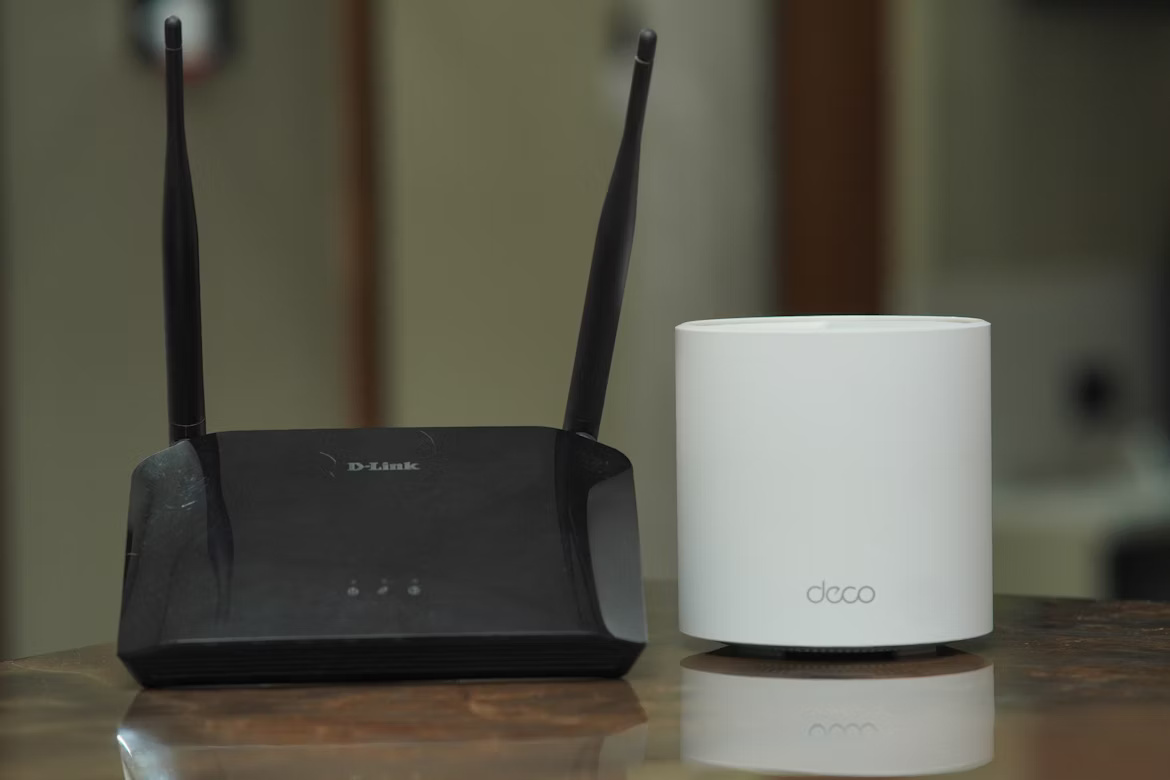
Choosing the right networking hardware is a critical decision for any business, directly impacting productivity and daily operations.
Two common solutions for providing wireless connectivity are traditional routers and mesh Wi-Fi systems, and while both get your team online, they function very differently at scale.
This article will compare routers and mesh systems, outlining their core differences, benefits, and ideal use cases to help you decide which is right for your organization.
What is a Router?
A router is a networking device that connects your business to the internet. It acts as a central hub, receiving data from your modem and distributing it to connected devices like computers, printers, and servers. This process creates a local area network (LAN), allowing all your devices to communicate with each other and share a single internet connection. Think of it as the traffic controller for your company's network.
Its primary jobs include:
- Directing incoming and outgoing internet traffic to ensure data packets reach the correct device.
- Assigning a unique IP address to every device on the network for clear identification.
- Offering a first line of defense against online threats through a built-in firewall.
What is a Mesh System?
A mesh system provides Wi-Fi coverage using multiple access points, or nodes, that work together to form a single, unified network. Instead of broadcasting from one central point, these nodes are placed throughout an office or building to blanket the entire area with a consistent signal. One node connects to the modem, and the others communicate with each other to extend connectivity.
Its main functions are to:
- Eliminate Wi-Fi dead zones in large or structurally complex spaces.
- Provide seamless roaming by automatically connecting devices to the strongest node without interruption.
- Broadcast a single network name (SSID), simplifying the connection process for all users.
Router vs Mesh System: Key Differences
While both technologies get your devices online, their underlying architecture creates key differences in performance, scalability, and management.
1. Coverage Area
A router broadcasts its signal from one central location. The farther a device is from the router, the weaker the signal becomes, which can create dead zones in larger spaces.
A mesh system, however, uses multiple nodes to blanket an entire area with Wi-Fi. This distributed approach is designed to provide consistent coverage across large offices or buildings with challenging layouts.
2. Performance and Roaming
With a single router, connection speed degrades with distance and obstructions. If you use extenders, devices often must manually switch between networks, causing connection drops.
Mesh systems operate under a single network name (SSID). This design supports uninterrupted roaming, automatically handing off devices to the strongest node as users move through the office.
3. Scalability and Setup
Scaling a router-based network often requires adding separate range extenders or access points, which can be complex to configure and manage as distinct networks.
Mesh networks are built to scale easily. Adding a new node to expand coverage is typically a simple plug-and-play process managed through a central application.
4. Management
A router is managed as a single device, usually through a web-based admin panel. Each additional access point or extender requires its own separate configuration.
An entire mesh system is managed as one unified network. This allows IT teams to apply security updates, change passwords, or monitor performance for all nodes from a single dashboard.
Benefits of Using a Router
A traditional router remains a powerful and practical choice for many business environments, offering several distinct advantages, especially when extensive coverage is not the primary concern.
- Cost-Effectiveness: For smaller offices or specific departments, a single high-performance router is often more budget-friendly than a multi-node system. It provides robust connectivity without the cost of additional hardware.
- Advanced Features and Control: Business-grade routers typically offer deep customization options. IT teams can configure Quality of Service (QoS) to prioritize traffic for applications like VoIP, set up complex firewall rules, and manage VPN access from one interface.
- Maximum Performance in a Concentrated Area: A powerful router delivers high-speed, low-latency connections to devices within its range. This direct connection is ideal for stationary, high-demand workstations that require maximum throughput without signal handoffs.
- Simplified Management for Small Networks: In a compact setting, managing one device is inherently simpler. A single router means one point of administration for updates, security settings, and troubleshooting, reducing complexity for the IT team.
Advantages of a Mesh System
For businesses with large or complex layouts, a mesh system offers significant benefits by creating a robust and flexible network environment.
- Consistent Coverage Everywhere: Mesh systems excel at blanketing large areas—like multi-story offices, warehouses, or campuses—with a strong, reliable Wi-Fi signal. This eliminates dead zones, keeping every device connected, no matter where it is.
- Uninterrupted Mobility for Users: Employees can walk through the building on a video call or while accessing files without connection drops. The network intelligently and automatically switches devices to the nearest node for the strongest signal, supporting a truly mobile workforce.
- Simplified Expansion: Growing your network coverage is straightforward. Instead of configuring separate extenders, you can simply add another node to the system. It integrates automatically, making it easy to adapt to changing office layouts or expansions.
- Unified Network Administration: The entire system is managed through a single dashboard. This allows IT teams to monitor performance, apply security updates, and manage user access for all nodes at once, greatly reducing administrative complexity.
Choosing the Right Network Solution for Your Enterprise
Making the right choice comes down to evaluating your specific business environment and operational needs. Here are the key factors to consider when deciding between a router and a mesh system.
1. Evaluate Your Physical Space
Start by looking at your office layout. A single, powerful router can effectively cover a smaller, open-plan office without significant physical barriers.
However, if your workspace is large, has multiple floors, or is constructed with signal-blocking materials like concrete and steel, a mesh system is the more practical solution. Its multiple nodes work together to provide consistent coverage across these challenging environments.
2. Assess User and Device Demands
Consider how many people and devices will connect to the network. A business-grade router is built to handle high traffic, making it suitable for a dense cluster of users in a single area, like a trading floor or a design studio.
If your employees and devices are spread throughout a larger facility, a mesh system helps distribute the network load. This prevents any single access point from becoming a bottleneck and ensures stable performance for everyone.
3. Prioritize Performance and Mobility Needs
Think about how your team works. If most employees are at stationary desks and require the highest possible speeds for data-intensive tasks, a dedicated router often provides the most direct and powerful connection.
Conversely, for organizations that depend on employee mobility—such as those in logistics, healthcare, or large corporate campuses—a mesh system is essential. It allows staff to move freely without experiencing the connection drops that can disrupt video calls or access to cloud applications.
Final Thoughts on Network Solutions
Ultimately, the decision between a router and a mesh system isn't about which technology is superior, but which is the right fit for your specific operational environment.
A high-performance router remains an excellent, cost-effective solution for smaller offices or specific zones where users are mostly stationary and require maximum connection speed.
In contrast, a mesh system is designed for larger facilities with multiple floors or signal-blocking walls. It provides the reliable, widespread coverage needed to support a mobile workforce without connection interruptions.
By carefully evaluating your physical space, device density, and mobility needs, you can confidently select the network foundation that supports your team's productivity and growth.
Need Help Managing Your Network? Lightyear Can Help

Once you've decided between a router or mesh system, the next challenge is procurement and management. Lightyear automates the entire telecom lifecycle, from sourcing your network services to consolidating the bills.
By automating procurement, inventory, and payments, we help companies save over 70% in time and reduce costs by more than 20% on their network services.
Schedule a demo or get started with our questionnaire today.
Frequently Asked Questions about Router vs Mesh System
Can I use a mesh system with my existing router?
It's possible, but generally not recommended. Most mesh systems are designed to replace your router entirely. Using both can create network conflicts. For optimal performance and unified management, it is best to let the main mesh node function as your primary router.
Are mesh systems less secure than business-grade routers?
Not inherently. Both offer strong security features like WPA3 encryption and firewalls. However, high-end business routers often provide more advanced, granular control over security policies, such as complex VPN configurations and intrusion detection systems that some enterprises may require.
Do mesh nodes offer wired Ethernet ports?
Yes, most mesh nodes include at least one Ethernet port. This allows you to connect stationary devices like desktop computers, printers, or network-attached storage directly to a nearby node, ensuring a stable, high-speed connection within the wireless environment.
Let us show you the product and discuss specifics on how it might be helpful.
Schedule a Demo





Revolutionize Your Telecom Experience
Learn how you can get one step closer to optimal business efficiency for all your telecom services.
