Telekom Router vs FRITZ!Box: Enterprise Comparison
Deciding between a Telekom Router and a FRITZ!Box? Our enterprise comparison breaks down the specs, security, and costs to help you choose.

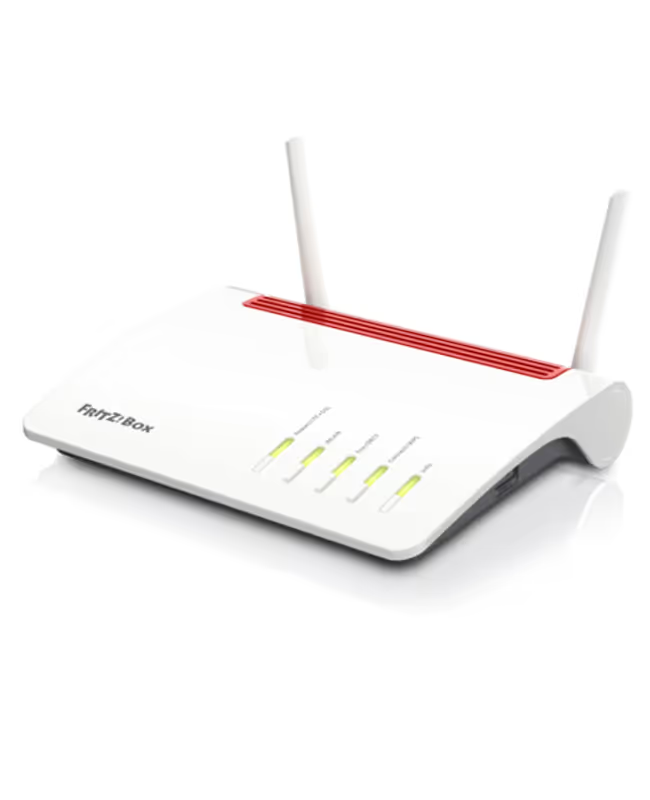
Selecting the right router is a foundational step for building a reliable and high-performing business network. For many companies, especially in Europe, the choice often comes down to two major players: routers from Deutsche Telekom and the popular FRITZ!Box series from AVM.
While both offer robust connectivity, they come with different feature sets, management philosophies, and target use cases that can significantly impact your IT operations. This article provides a direct comparison to help you determine which option is the better fit for your enterprise needs.
What is a Telekom Router?
A Telekom router, often marketed under the brand name Speedport, is the dedicated hardware provided by Deutsche Telekom to its subscribers. These devices are specifically designed to integrate smoothly with Telekom's network, making them a common and straightforward option for customers using their internet and voice services.
- Bundled with Contracts: Telekom routers are typically offered as part of a business internet or communications package, either for rent or purchase.
- Optimized for Telekom's Network: They come pre-configured for a simple setup process, ensuring immediate compatibility with Telekom's infrastructure.
- Core Features: The main purpose is to provide stable internet access, Wi-Fi, and essential VoIP telephony functions for standard business needs.
- Provider-Managed Interface: Management and configuration are handled through a specific Telekom web portal, which simplifies support and troubleshooting.
What is a FRITZ!Box?
A FRITZ!Box is a router manufactured by the German company AVM. Sold independently of internet service providers, these devices are widely recognized for their advanced functionality and compatibility across various networks, making them a popular choice for users who want more control and features.
- Provider-Independent: They are designed to work with almost any ISP, offering businesses flexibility if they switch providers.
- Advanced Feature Set: A FRITZ!Box often includes a comprehensive suite of tools, such as a full telephone system (PBX), DECT base station, Wi-Fi mesh capabilities, and network-attached storage (NAS) functions.
- User-Centric Control: The FRITZ!OS operating system provides a detailed web interface that gives administrators granular control over network configuration, monitoring, and security.
- Consistent Updates: AVM is known for providing regular, long-term firmware updates that introduce new features and apply security patches, extending the hardware's lifespan.
Telekom Router vs FRITZ!Box: Key Differences
When you look closer, the primary distinctions between these routers fall into a few key areas that directly affect how you manage your network and budget.
1. Hardware Flexibility and Choice
Telekom routers are typically standardized models offered with your contract, designed to meet the core needs of their service. There is often little choice in the hardware itself.
In contrast, AVM provides a wide range of FRITZ!Box models. This allows businesses to select a device with specific features, such as more LAN ports or advanced Wi-Fi capabilities, to match precise operational requirements.
2. Software Ecosystem and Functionality
A FRITZ!Box operates on FRITZ!OS, which includes a comprehensive suite of tools like a full PBX telephone system, a DECT base for cordless phones, and network-attached storage (NAS) functions.
Telekom's Speedport routers offer a more simplified software experience. The focus is on providing stable internet and basic VoIP, with fewer advanced networking or integrated server functions available out of the box.
3. Cost and Ownership Model
A key financial difference is the ownership model. Telekom routers are usually rented for a monthly fee, which means you never own the device and must return it if you change providers.
A FRITZ!Box is purchased outright. While this requires a higher initial investment, it becomes a company asset that offers long-term value and can be used with any ISP.
Performance and Speed Comparison
When it comes to raw speed, both Telekom routers and FRITZ!Box devices are engineered to deliver high performance, but their strengths show in different areas. The right choice often depends on how you plan to use your network and the specific demands of your office environment.
- Baseline Speed: Telekom's Speedport routers are optimized to deliver the maximum speed of your subscribed internet plan. For businesses that simply need reliable, fast internet access directly from their provider, these devices perform very well.
- Throughput and Stability: FRITZ!Box routers are widely recognized for their powerful hardware, which often results in superior throughput and stability, especially under heavy network load. If your office has many connected devices or runs bandwidth-intensive applications, a FRITZ!Box can often handle the traffic more effectively.
- Wi-Fi Performance: While both router types support modern Wi-Fi standards, AVM's FRITZ!Box models are frequently praised for their advanced Mesh Wi-Fi capabilities. This technology creates a more powerful and seamless wireless network across larger spaces, which is a significant advantage for offices with tricky layouts or coverage gaps.
Security Features and Protocols
Network security is non-negotiable, and both routers approach it with different philosophies that impact your control over the network's defenses.
1. Firewall and Access Control
Telekom routers come with a standard, pre-configured firewall designed to block common threats with minimal setup. While effective for baseline security, it offers limited options for custom rules or advanced configurations.
A FRITZ!Box, on the other hand, provides a highly configurable firewall. IT administrators have granular control to set specific access rules, manage port forwarding, and filter content, allowing for a more customized security posture.
2. Firmware Updates and Patching
With a Telekom router, firmware updates containing security patches are pushed automatically by the provider. This ensures the device stays protected against known vulnerabilities without manual intervention from your team.
AVM provides frequent and long-term firmware updates for the FRITZ!Box, which users are notified about and can install themselves. This gives you control over the update process and timing, ensuring changes are made on your schedule.
3. VPN and Remote Access
VPN capabilities on standard Telekom routers are often basic. Establishing secure remote access for employees typically requires additional hardware or software solutions.
Most FRITZ!Box models feature robust, built-in VPN support using IPSec. This allows businesses to easily create secure tunnels for remote workers directly through the router's interface, simplifying remote access management.
User Experience and Support
How you interact with your router and get help when things go wrong are critical factors in day-to-day operations. The approach to usability and support differs significantly between Telekom and AVM.
- Telekom Router: The user experience is designed for simplicity. Management happens through a standardized web portal, and support is centralized through Deutsche Telekom's customer service. This creates a single, integrated point of contact for troubleshooting both your internet service and your hardware.
- FRITZ!Box: The experience is geared toward control and information. The FRITZ!OS interface provides deep access to settings and diagnostics. Support comes directly from the manufacturer, AVM, which is well-regarded for its extensive documentation and active user forums, though it is separate from your ISP's support channel.
Making the Right Choice for Your Enterprise
Ultimately, the decision between a Telekom router and a FRITZ!Box comes down to your company's priorities: integrated simplicity versus independent control.
If your business values a straightforward, hands-off approach where hardware and support are managed directly by your internet provider, a Telekom router is the logical choice. It’s built for reliability and ease of use within the Telekom ecosystem.
However, if your IT team requires granular network control, advanced features like a built-in phone system or robust VPN, and the flexibility of owning your hardware, a FRITZ!Box is the superior option. It offers long-term value and adaptability for more complex operational demands.
Need Help Managing Your Network? Lightyear Can Help

Choosing the right router is just one piece of the puzzle. Lightyear helps manage the entire telecom lifecycle, from procuring the best internet service for your hardware to tracking it in a digital inventory.
By automating procurement and consolidating billing, enterprises using Lightyear save over 70% in time and 20% in costs on their network services.
Schedule a demo or get started with our questionnaire today.
Frequently Asked Questions about Telekom Router vs FRITZ!Box
Can I use my own FRITZ!Box on a Deutsche Telekom connection?
Yes, absolutely. FRITZ!Box routers are compatible with Telekom's network. You will just need to manually enter your connection details provided by Telekom during setup, rather than using the pre-configured setup of a Speedport router.
What happens if I already have a rented Telekom router and want to switch?
If you switch to a FRITZ!Box, you will need to terminate the rental agreement for the Telekom router. This usually involves returning the device to Deutsche Telekom to stop the monthly rental fees on your bill.
Is setting up a FRITZ!Box difficult for a business without a dedicated IT team?
While a FRITZ!Box requires more manual setup than a plug-and-play Telekom router, AVM provides clear instructions and wizards. For standard internet and Wi-Fi, the process is straightforward and manageable for most tech-savvy users.
Do I lose any specific Telekom services by not using their router?
In most cases, no. A FRITZ!Box can handle Telekom's internet and VoIP telephony. However, for certain bundled services like MagentaTV, you may need to ensure your FRITZ!Box model supports the required protocols for full compatibility.
Let us show you the product and discuss specifics on how it might be helpful.
Schedule a Demo





Revolutionize Your Telecom Experience
Learn how you can get one step closer to optimal business efficiency for all your telecom services.
