Vodafone Router vs FRITZ!Box: Enterprise Comparison
Vodafone Router vs. FRITZ!Box: Which is right for your business? We compare features, performance, and security for enterprise network needs.

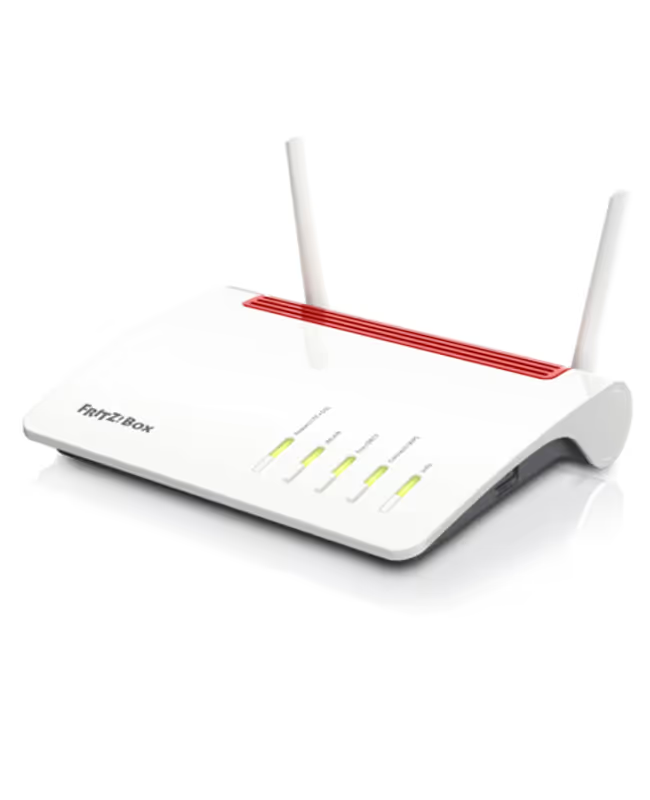
Choosing the right router for your business is a critical decision that impacts network performance, security, and daily operations. For many companies, the choice often comes down to using the standard hardware provided by an internet service provider, like Vodafone, or purchasing a third-party device, such as a FRITZ!Box.
While both get your business online, they offer different approaches to network management and functionality. This article provides a straightforward comparison to help IT and telecom managers determine which solution is a better fit for their enterprise needs.
What is a Vodafone Router?
A Vodafone router is the standard hardware provided by Vodafone when you sign up for one of their business internet plans. It's the gateway that connects your office network to the internet through Vodafone's infrastructure, designed to get your operations online with minimal fuss. Here’s a look at their core characteristics:
- Plug-and-Play Setup: Vodafone routers are designed for immediate use. They come pre-configured for the Vodafone network, which simplifies the initial installation process for your IT team.
- Standard Functionality: They provide all the essential features needed for a small to medium-sized office, including Wi-Fi connectivity, multiple Ethernet ports for wired connections, and basic firewall protection.
- Unified Support: Because the hardware comes from your ISP, any technical support, troubleshooting, or device replacement is handled directly through Vodafone’s customer service channels.
- Bundled Cost: The cost of the router is typically bundled into your monthly service fee, so there is no separate, upfront hardware purchase required.
- ISP-Managed Firmware: Vodafone manages all firmware updates remotely. This ensures the device remains compatible with network changes, though it limits your ability to customize advanced settings.
What is a FRITZ!Box?
A FRITZ!Box is a third-party router from the German manufacturer AVM, known for its advanced features and robust performance. Unlike hardware tied to an ISP, it's purchased separately and gives businesses greater control over their network infrastructure. They are a popular choice for organizations that need more than just basic connectivity.
- Advanced Customization: FRITZ!Box offers a detailed interface with granular control over settings like VPNs, Quality of Service (QoS), and network monitoring, which is ideal for complex IT environments.
- Broad ISP Compatibility: These routers are not locked to a specific provider and support various connection types, including DSL, cable, and fiber. This provides flexibility if you decide to switch ISPs.
- Integrated Functionality: Many models act as a central hub, combining a router with a DECT base for phones, a media server, and Network Attached Storage (NAS) capabilities.
- Upfront Hardware Cost: It requires a one-time purchase, but you own the device outright and can use it with different service providers.
- Frequent Firmware Updates: AVM regularly provides updates that add new features and security patches, which users can install themselves.
Key Differences Between Vodafone Router and FRITZ!Box
While both devices connect you to the internet, they operate on fundamentally different principles. The primary distinctions lie in their cost structure, flexibility with service providers, and the breadth of their built-in features.
1. Cost and Ownership Model
A Vodafone router is typically included with your business internet plan, meaning there's no separate upfront cost. You are essentially renting the device for the duration of your contract.
In contrast, a FRITZ!Box requires a one-time purchase. While this is an initial investment, you own the hardware outright, which can be more economical over the long term if you retain it across multiple service contracts.
2. Provider Flexibility
The Vodafone router is locked to the Vodafone network. It is pre-configured for their service and cannot be used if you switch to a different internet service provider.
A FRITZ!Box is provider-agnostic. It offers the freedom to change ISPs without needing to replace your router, allowing you to maintain your network settings and configurations.
3. Integrated Functionality
Vodafone routers focus on the core task of providing reliable internet connectivity. Their feature set is designed to cover essential networking needs without extra complexity.
FRITZ!Box models often serve as an all-in-one office hub. Many include integrated systems like a DECT base for cordless phones, a media server, and Network Attached Storage (NAS) capabilities, which can reduce the need for separate hardware.
Performance and Speed Comparison
When it comes to raw performance, both routers are capable, but they are built for different use cases. A FRITZ!Box is generally engineered for higher throughput and more demanding network environments, which can be a key factor for a busy office.
- Standard vs. High-Performance Hardware: A Vodafone router is calibrated to deliver the speeds promised in your internet plan, providing consistent performance for standard business activities. In contrast, FRITZ!Box routers are known for more powerful hardware, which often translates to better Wi-Fi range and more stable connections, especially in larger offices or areas with signal interference.
- Handling Network Congestion: The standard Vodafone router is perfectly adequate for a moderate number of devices. However, a FRITZ!Box typically excels at managing heavy network traffic from dozens of concurrent users and devices. Its advanced Quality of Service (QoS) features allow IT managers to prioritize critical applications, ensuring VoIP calls or video conferences remain smooth even when the network is busy.
- Internal Network Speed: For internal tasks like transferring large files between computers or backing up data to a network-attached storage (NAS) device, a FRITZ!Box usually offers faster local network (LAN) speeds. This is due to its support for the latest Wi-Fi standards and higher-grade components, which improves internal operational efficiency.
Security Features and Protocols
Network security is a top priority for any business, and each router approaches it differently. The main distinction comes down to managed simplicity versus hands-on control.
Vodafone Router: ISP-Managed Security
A Vodafone router provides foundational security that is managed for you. It includes a standard firewall that is pre-configured to block common threats, requiring no initial setup from your team.
Security patches and firmware updates are handled remotely by Vodafone. This means your device stays current with the latest protections without requiring manual intervention from your staff.
FRITZ!Box: Granular Security Control
A FRITZ!Box gives your IT team direct, granular control over security protocols. Its advanced firewall can be customized with specific rules tailored to your organization’s needs.
It also offers more sophisticated features, such as creating separate guest Wi-Fi networks to keep visitor devices off your primary network and detailed reporting on network activity. While you are responsible for installing the regular firmware updates from AVM, this control allows you to schedule updates at your convenience and access new security features as they are released.
User Experience and Interface
The way you interact with your router’s software is another key point of difference. The user interface for each device reflects its core philosophy—one prioritizing simplicity, the other offering deep control.
- Vodafone Router: The web interface is clean and straightforward, designed for a "set it and forget it" approach. It provides basic information like connection status and a list of connected devices. Since most advanced configurations are managed remotely by Vodafone, the user experience is intentionally minimal and requires little interaction.
- FRITZ!Box: The FRITZ!OS interface is a detailed dashboard built for active network management. It offers comprehensive diagnostics, real-time traffic monitors, and clear menus for accessing a wide array of settings. This gives IT managers a powerful tool for monitoring and fine-tuning network performance directly, making the experience much more hands-on.
Making the Right Choice for Your Enterprise
Deciding between a Vodafone router and a FRITZ!Box comes down to your company's operational priorities and IT resources.
If your business values a straightforward, managed solution with support handled by your ISP, the Vodafone router is a practical choice. It’s ideal for organizations that need reliable connectivity without requiring deep network customization.
On the other hand, if your IT team needs granular control over network settings, advanced security features, and the freedom to switch providers, a FRITZ!Box is the superior option. It's built for businesses managing complex network traffic and seeking long-term hardware independence.
Need Help Managing Your Network? Lightyear Can Help

Whether you choose a Vodafone router or a FRITZ!Box, managing the underlying network services and hardware inventory adds another layer of complexity. By automating network service procurement, inventory management, and bill consolidation, Lightyear takes the pain out of telecom infrastructure management.
The hundreds of enterprises who trust Lightyear achieve over 70% time savings and 20% cost savings on their network services. Schedule a demo or get started with our questionnaire today.
Frequently Asked Questions about Vodafone Router vs FRITZ!Box
Can I use a FRITZ!Box with my Vodafone business plan?
Yes, a FRITZ!Box is compatible with most ISPs, including Vodafone. You would connect it to your Vodafone line instead of their provided hardware, but you will likely need to configure it with Vodafone's specific network settings to get it online.
Will using a FRITZ!Box affect my support from Vodafone?
Vodafone’s support covers issues up to their network entry point. If a problem is traced to your FRITZ!Box, you will need to rely on AVM's support or your internal IT team, as Vodafone’s customer service does not troubleshoot third-party hardware.
Which router is better for a multi-site business?
For multi-site operations, a FRITZ!Box often provides more value. Its advanced VPN capabilities and consistent interface across locations can simplify network management, especially if you use different ISPs at various sites. The Vodafone router is simpler but less flexible for complex setups.
Do I need technical expertise to set up a FRITZ!Box?
Basic setup is straightforward thanks to a user-friendly wizard. However, to take full advantage of its advanced features like custom VPNs or Quality of Service (QoS) settings, some networking knowledge is beneficial. It is designed for users who want more hands-on control.
Let us show you the product and discuss specifics on how it might be helpful.
Schedule a Demo





Revolutionize Your Telecom Experience
Learn how you can get one step closer to optimal business efficiency for all your telecom services.
